
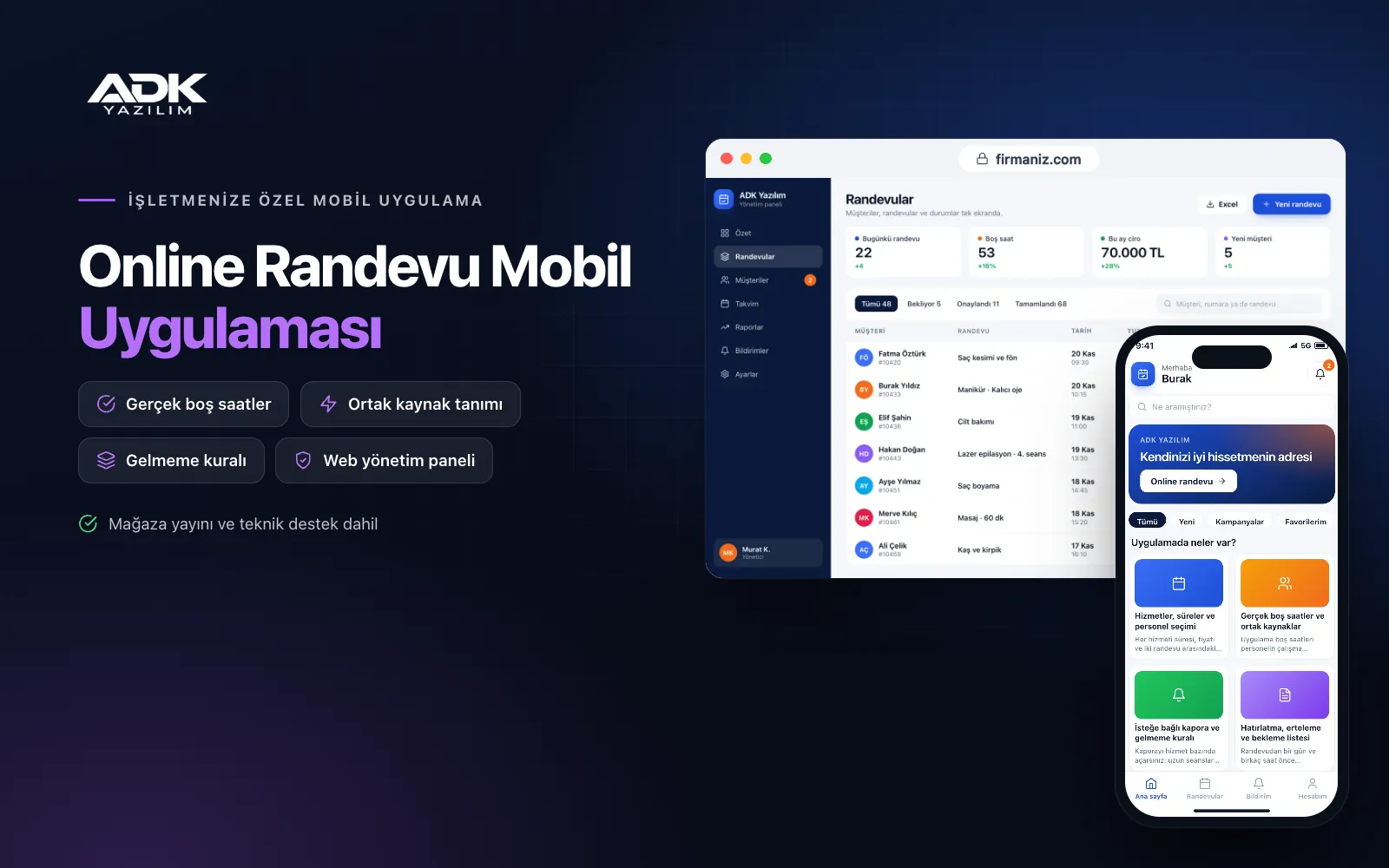
An appointment booking mobile app gives any business that works by appointment, from clinics and consultancies to car washes and private tutors, an app of its own for its customers. Customers choose a service and a member of staff, see only slots that are genuinely free and book in a few taps. Instead of arranging times on the phone, writing them in a diary and chasing forgotten appointments, your calendar fills itself.
A reminder goes out before each appointment, customers reschedule or cancel within your rules, and freed slots are offered to people on the waiting list. If you wish, you take a card deposit for selected services. The app is published under your business name on Google Play, on the App Store or on both, and unlike our sector-specific apps, you define your services and rules to suit your own work.
Who is it for?
- Clinics and health consultants: Session-based practitioners such as dietitians, counsellors and physiotherapists.
- Consultancies and law offices: Offices that want orderly meeting times and fewer last-minute cancellations.
- Car washes, garages and workshops: Businesses working with limited resources such as a wash bay or a lift.
- Private tutors and course providers: Teachers opening lesson times to students and parents through their own app.
- Photography, design and other studios: Studios securing shoots or meetings with a deposit.
Features that keep your appointment calendar in order
Services, durations and staff choice
You define each service with its duration, price and the preparation time between appointments, and set which staff provide which service. Customers choose a member of staff or select “no preference”, and the app assigns the first one available. Each person’s working hours, breaks and days off are kept separately.
Genuinely free slots and shared resources
The app works out free slots from staff working hours, existing appointments and the service duration. You can also define resources that only one person can use at a time, such as a room, a device, a wash bay or a lift; if the resource is taken, the slot is not shown even when staff are free. Clashing appointments simply cannot happen.
Optional deposits and a no-show rule
You switch deposits on per service: take a card payment upfront for long sessions or busy times, and work without one for short services. Customers who miss an appointment without notice are marked in the panel, and after the number of no-shows you set, a deposit is required automatically for their future bookings.
Reminders, rescheduling and a waiting list
A reminder notification goes out a day and a few hours before the appointment. Customers reschedule or cancel themselves up to the cut-off you set, after which your cancellation policy applies. Customers who join the waiting list for a full day or time range are notified when a suitable slot frees up, and the first to confirm gets it.
Customer history and repeat reminders
Each customer’s past appointments, services and staff notes, visible only in the panel, sit on a single card. Customers rebook the same service in one tap. If you set a repeat interval for recurring services, customers receive a “time to book” reminder when it comes round.
How do you get started?
- Choose your plan: Pick Starter (one platform) or Standard / Professional (Android + iOS) to match the phones your customers use.
- Send your services: Share your service list, durations and prices, staff working hours and cancellation rules.
- Publishing and setup: We build the app under your business name, import your customer list and handle publishing in your store accounts.
- Invite your customers: Customers download the app from the QR poster at your desk, your business card or the link in your message signature.
Infrastructure, security and support
The app and web admin panel run on ADK infrastructure, and data is backed up every day. Deposits go through an iyzico or PayTR account opened in your business’s name; card details are never stored by the app or panel, and the transaction commission is paid to the payment provider. Customers see only their own appointments, staff notes are never shown to customers, and each member of staff signs in with their own password and permissions. The developer account for each store the app is published on is opened in your business’s name; the business pays the account fees and we handle publishing and updates.
The app is published under your business name in the store you choose (Google Play, the App Store or both); the web admin panel and server run on ADK infrastructure, so no separate server or domain is needed. The Google Play and Apple Developer Program accounts are opened in your business’s name; the account fees are not included, and we handle setup and publishing. The first-year fee covers brand customisation, setup, customer import and training; from the second year a yearly hosting, update and support fee applies, lower than the first-year price. You can start with one platform on Starter and move to Standard (Android + iOS) by paying the difference. Deposits are taken through an iyzico or PayTR account opened in your business’s name, and the transaction commission is paid to the payment provider. More staff accounts, a multi-branch set-up, sync with calendar apps, video calls, e-invoicing and SMS sending are not included and can be added through custom development.
Fast delivery
Our ready-made product foundations get your project live quickly.
Security first
Secure coding standards, encrypted connections and regular updates.
Ongoing support
Maintenance, updates and technical support after launch. We stay by your side.



