
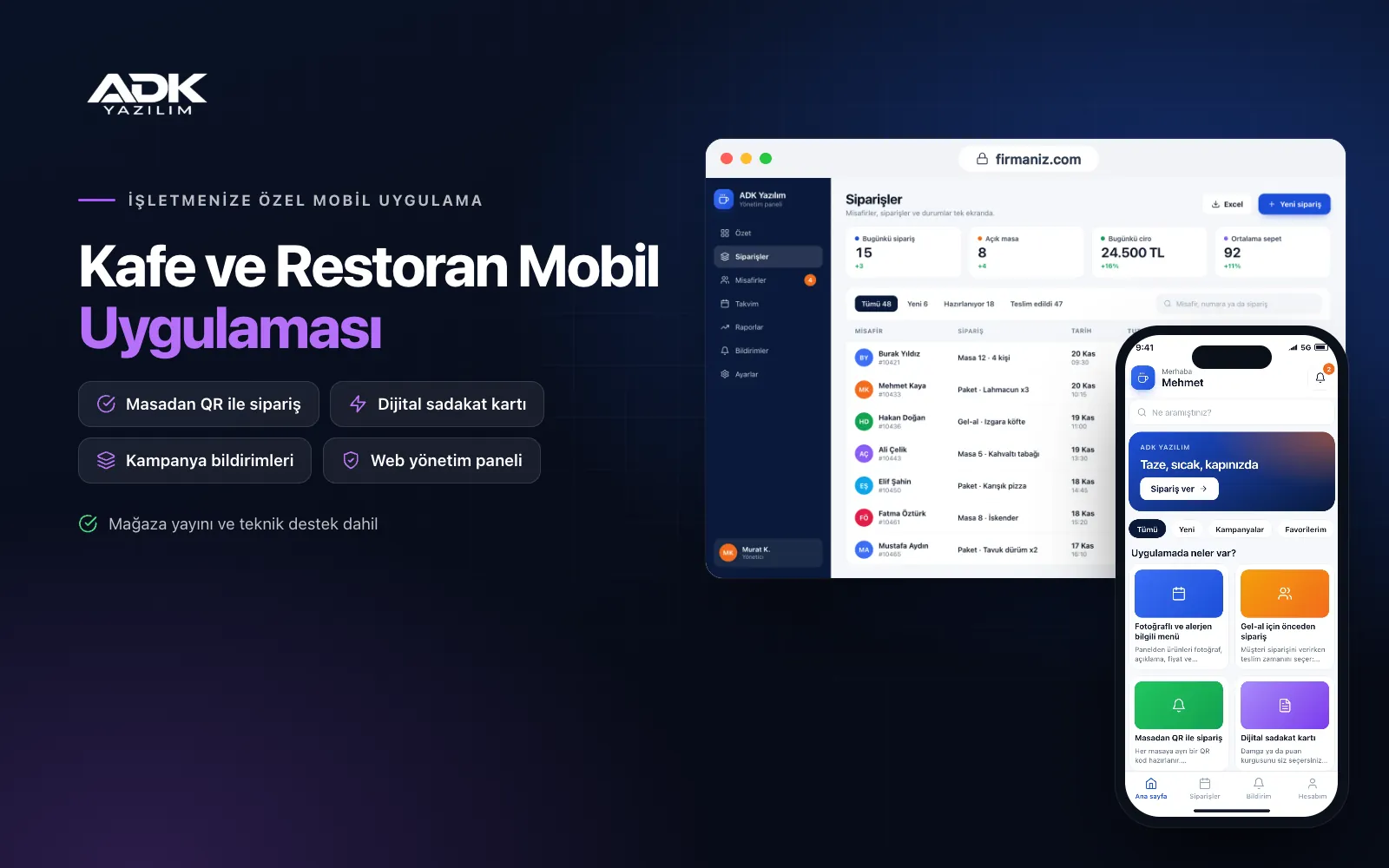
A café and restaurant mobile app sits on your customers’ phones with your business name and logo, bringing the menu, ordering, reservations and the loyalty card together. Customers check ingredients and allergens in a photo menu, order their coffee on the way and collect it when ready, or scan the QR code on the table and order from their seat. Queues at the till, misheard orders and lost paper stamp cards become rarer.
Unlike a web-based QR menu or an online ordering website, the app stays on the customer’s phone: the loyalty card fills up with every order, campaigns arrive as notifications and regulars repeat their last order in one tap. The app is published under your business name on Google Play, on the App Store or on both, and orders arrive on the kitchen and bar screens in the web panel.
Who is it for?
- Coffee shops: Businesses that want to clear the morning queue with pick-up orders placed in advance.
- Restaurants and bistros: Venues that want table reservations, table ordering and loyalty campaigns in a single app.
- Patisseries and dessert shops: Shops that want more repeat visits through pick-up orders and free-item rewards.
- Campus and business district cafés: Cafés serving a large lunchtime crowd that expects fast service.
- Businesses building their brand: Owners who want their own app in the stores to reach customers directly.
Features that make the working day easier, from ordering to loyalty
A photo menu with allergen details
In the panel you add products with photos, descriptions, prices and options such as size, milk type or an extra shot. Each item can carry allergen markers such as gluten, milk and nuts, plus vegan or vegetarian labels, and customers can filter the menu by allergen. When something runs out, one tap marks it “sold out” in the app.
Order ahead for pick-up
Customers choose when to collect: as soon as possible or at a later time. You set preparation times by product and by how busy you are, and can pause pick-up orders at peak moments. When the order is ready the customer is notified and collects it by name from the pick-up point, without queuing at the till.
Table ordering by QR code
Each table gets its own QR code. Scanning it with the app links the order to that table and shows call-a-waiter and ask-for-the-bill buttons. Orders at the same table share one bill, and staff add orders from guests without the app to that table. The bill is paid by card in the app or at the till.
A digital loyalty card
You choose stamps or points: for example a free coffee after a set number of coffees, or points based on spend. Stamps are added automatically to app orders, and at the till staff scan the customer’s QR card. The panel prevents a second stamp for the same receipt and blocks repeated scans within a short time.
Kitchen and bar order screens
The panel has separate screens for the kitchen and the bar, so drinks go to the bar and food to the kitchen. Each order shows its arrival time, table or pick-up details and the customer’s note, and an order that has waited too long changes colour. Orders marked “ready” are announced to the customer. The screen runs on a tablet or in a browser.
Table reservations and campaign notifications
Customers choose a date, time and party size and send a reservation request; you confirm it or suggest another time, and the customer is notified. Campaigns such as a hot drinks offer on a rainy day or the new season’s menu go out as notifications to all customers or only to those who have not visited for a while. No SMS is needed.
How do you get started?
- Choose your plan: Pick Starter (one platform) or Standard / Professional (Android + iOS) to match the phones your customers use.
- Send your menu and brand details: Share your logo, colours, menu, product photos and table layout; we import the menu from Excel.
- Publishing and setup: We build the app under your business name, create the table QR codes and handle publishing in your store accounts.
- Invite your customers: Customers download the app from the QR posters at the till and on the tables.
Infrastructure, security and support
The app and web admin panel run on ADK infrastructure, and data is backed up every day. Card payments go through an iyzico or PayTR account opened in your business’s name; card details are never stored by the app or panel, and the transaction commission is paid to the payment provider. Customers see only their own orders and loyalty card, and staff sign in with their own passwords and permissions. The developer account for each store the app is published on is opened in your business’s name; the business pays the account fees and we handle publishing and updates.
The app is published under your business name in the store you choose (Google Play, the App Store or both); the web admin panel and server run on ADK infrastructure, so no separate server or domain is needed. The Google Play and Apple Developer Program accounts are opened in your business’s name; the account fees are not included, and we handle setup and publishing. The first-year fee covers brand customisation, setup, menu import and training; from the second year a yearly hosting, update and support fee applies, lower than the first-year price. You can start with one platform on Starter and move to Standard (Android + iOS) by paying the difference. Card payments are taken through an iyzico or PayTR account opened in your business’s name, and the transaction commission is paid to the payment provider. Home delivery with courier tracking, connection to cash registers and POS terminals, automatic sync with your EPOS software, SMS sending and a multi-branch set-up are not included and can be added through custom development.
Fast delivery
Our ready-made product foundations get your project live quickly.
Security first
Secure coding standards, encrypted connections and regular updates.
Ongoing support
Maintenance, updates and technical support after launch. We stay by your side.



