
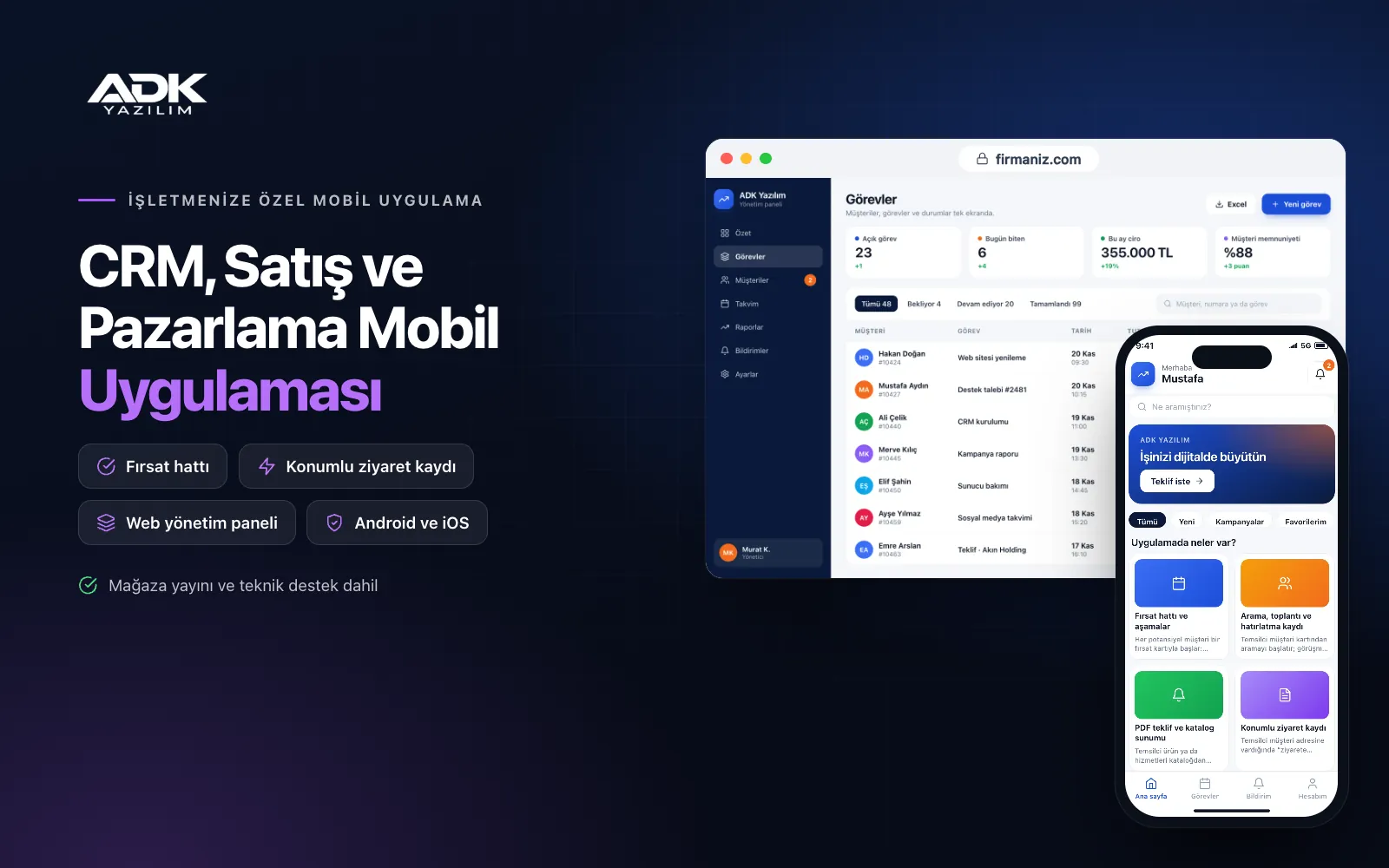
A CRM mobile app lets your sales team carry customer, opportunity and quote information on their phones in the field rather than leaving it on a desk. As soon as a rep walks out of a meeting they note what was said and the next step, send the quote as a PDF and set a reminder. Who last spoke to which customer, which quote awaits an answer and how much of this month’s target is reached no longer sit scattered across spreadsheets.
The app also brings the marketing side together. You group customers into lists by sector, city or interest and send app notifications or e-mail campaigns to the people who have agreed to receive commercial messages. The app is published under your company’s name on Google Play, on the App Store or on both, and the customers you invite can browse your catalogue and see the quotes sent to them in the same app.
Who is it for?
- B2B companies selling in the field: Teams who visit customers and run quoting and follow-up from their phones.
- Wholesalers and distributors: Sales teams tracking prospective dealers and corporate customers stage by stage.
- Service companies: Firms selling contracted maintenance, cleaning, security or consultancy services.
- Property, motor and insurance sales offices: Teams turning every enquiry into a call and a meeting.
- Sales managers: Managers who want to see the team’s daily activity, targets and pipeline on one screen.
Features your sales team uses every day
Pipeline and stages
Every prospect starts as an opportunity card with a source, estimated value, probability and expected closing date. You define the stages to match your own sales process, and reps drag cards between stages such as “first meeting”, “quote sent” and “negotiation”. Opportunities that sit in one stage for too long are flagged, and choosing a reason is required when a deal is lost, so the reports show why you lose business.
Call, meeting and reminder logs
Reps start a call from the customer card, and when the call ends the app asks for a short note and the next step. Meetings go into the calendar and a notification arrives when they are due. If a customer has not been contacted for the number of days you set, they move onto a “not contacted for a while” list. Warm customers are called again before they go cold, and a departing rep’s history stays with the company.
PDF quotes and catalogue presentations
Reps pick items from the catalogue, enter quantities, discounts and VAT, and the app produces a PDF quote on your letterhead template, ready to share by e-mail or message. Quote versions are kept, and acceptance or rejection is recorded on the opportunity card. During a customer visit the product catalogue opens in presentation mode on a tablet, with photos, descriptions and technical documents.
Location-stamped visits
When a rep arrives at a customer’s address they tap “start visit”; the app records the location and time at that moment, and when the visit ends they add a meeting note and photos. Location is taken only at these two moments, so reps are not tracked through the day. The sales manager sees weekly visit counts, the interval between visits per customer and areas no one has visited on a map.
Campaign lists and the targets dashboard
You filter customers by sector, city, last purchase date or tags to build campaign lists. Each list can receive an app notification or an e-mail campaign, and you can see who opened it and who asked for a quote. The targets dashboard shows each rep’s monthly sales, quote and visit targets next to the actual figures, with an optional team leaderboard.
How do you get started?
- Choose your plan: Pick Starter (one platform) or Standard / Professional (Android + iOS) to match the phones your sales team and customers use.
- Define your sales process: Share your pipeline stages, product list, quote template and each rep’s targets with us.
- Bring your data across: We import your existing customer and opportunity lists from Excel and publish the app under your company’s name.
- Invite your team: Create user accounts for your reps in the panel and, after remote training, move all follow-up into the app from the first week.
Infrastructure, security and support
The app and web admin panel run on ADK infrastructure, and data is backed up every day. Each rep sees only the customers and opportunities assigned to them, while sales managers and administrators see the whole team. When a departing rep’s account is closed, their customers can be handed over to another rep in one step. The developer account for each store the app is published on is opened in your company’s name; the company pays the account fees and we handle publishing and updates.
The app is published under your company’s name in the store you choose (Google Play, the App Store or both); the web admin panel and server run on ADK infrastructure, so no separate server or domain is needed. The Google Play and Apple Developer Program accounts are opened in your company’s name; the account fees are not included, and we handle setup and publishing. The first-year fee covers brand customisation, setup, initial configuration, customer and opportunity import from Excel and remote training; from the second year a yearly hosting, update and support fee applies, lower than the first-year price. You can start with one platform on Starter and move to Standard (Android + iOS) by paying the difference. E-mail campaigns are sent through your company’s own e-mail sending account, and collecting consent for commercial messages is the company’s responsibility. SMS is connected through your own SMS provider account and SMS charges are not included. Connection to the national commercial message register, phone system and call recording integration, and automatic sync with your accounting or ERP software are not included and can be added through custom development.
Fast delivery
Our ready-made product foundations get your project live quickly.
Security first
Secure coding standards, encrypted connections and regular updates.
Ongoing support
Maintenance, updates and technical support after launch. We stay by your side.



