
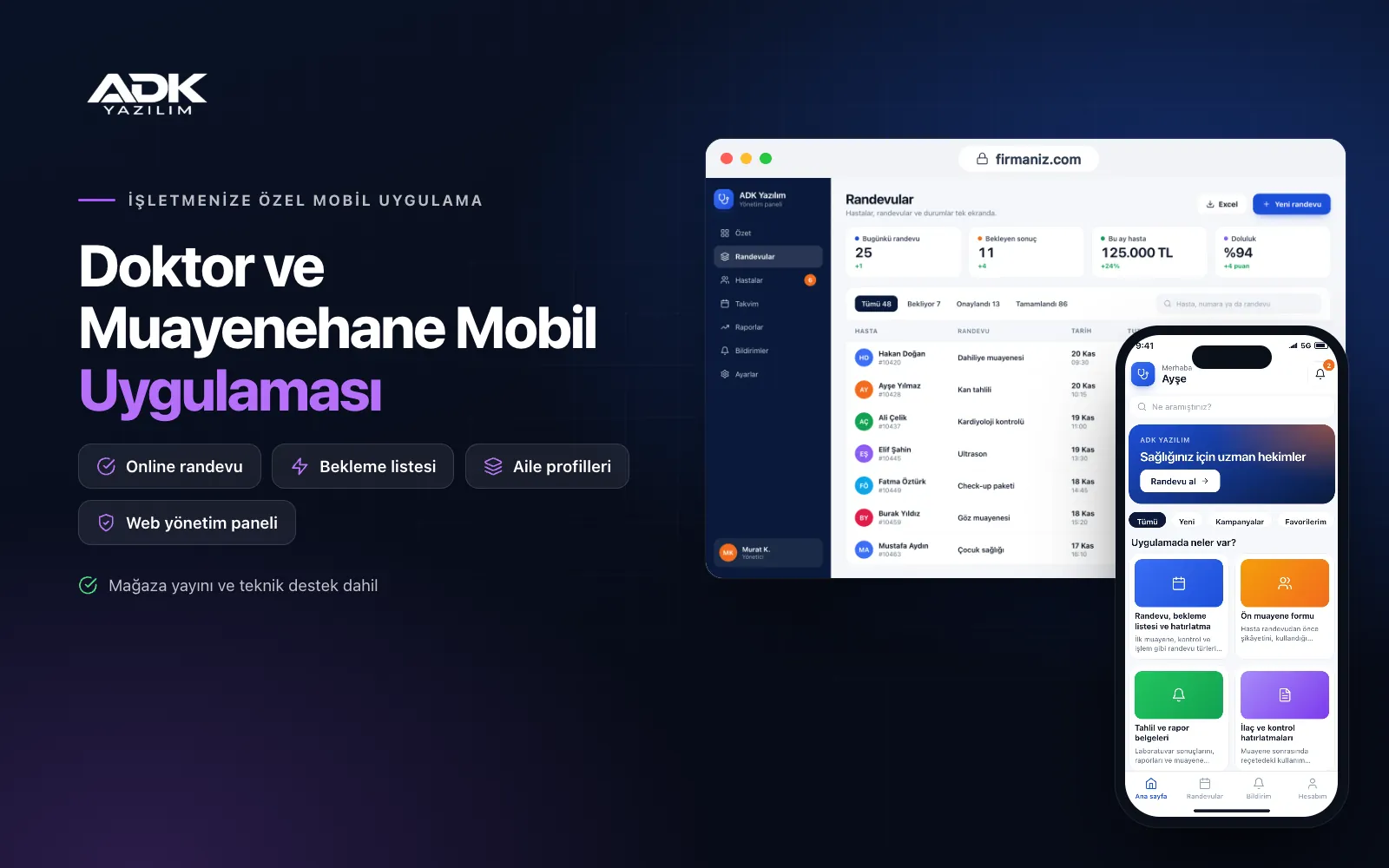
A doctor mobile app is your practice’s presence on your patients’ phones, listed in the store with your name, speciality and practice details. Patients book without phoning, no longer come in just to collect lab results and do not forget their follow-up dates. The questions your receptionist answers all day, such as “is there an appointment?”, “are my results ready?” and “is there parking?”, become far less frequent.
The app does not diagnose and does not replace an examination; it organises the relationship between your practice and your patients. Content is published in an informative tone in line with Turkish rules on health service advertising, and there are no sections such as patient reviews or before-and-after images. The app is published under your name on Google Play, on the App Store or on both.
Who is it for?
- Doctors in private practice: Specialists who want to run appointments and patient contact in an orderly way with their receptionist.
- Specialities with many follow-up patients: Doctors in fields that need regular monitoring, such as internal medicine, cardiology and endocrinology.
- Paediatricians: Practices where a parent manages several children’s appointments and documents from one account.
- Shared practices: Several doctors at the same address working with a shared reception.
- Newly opened practices: Doctors who want an organised digital patient experience from day one.
Every point of contact between your patients and the practice
Booking, waiting list and reminders
You define appointment types such as first visits, follow-ups and procedures, each with its length; patients choose a free slot, and if you prefer, the booking is confirmed only after the receptionist approves it. On fully booked days patients join a waiting list, and when an appointment is cancelled the patient on the list is notified. Reminders go out a day and a few hours before the visit.
Pre-visit forms
Before the appointment, patients use the form in the app to describe their complaint, the medicines they take, their allergies and their medical history, and give explicit consent for their health data at this step. You go into the consultation having already read the details, so the visit is not spent gathering information. You tailor the questions to your speciality in the panel.
Lab results and reports
The practice uploads lab results, reports and visit summaries to the patient’s file in the panel as PDFs or photos, and the patient receives a “your results have been uploaded” notification. You can add a short explanation or a “please come in for a follow-up” note to a document. Documents sit in the patient’s app in date order and can be shown to another doctor when needed.
Medication and follow-up reminders
After the visit you enter the dosage schedule from the prescription in the app; patients are notified at medication times and mark each dose as taken. When a follow-up date arrives the patient is reminded and goes straight to the booking screen with one tap.
Family profiles and secure messages
A parent manages appointments and documents for their children, or for an elderly relative in their care, through separate profiles on their own account. Patients send the practice written messages with photos; during working hours the receptionist answers them or passes them to the doctor. The message screen states clearly that 112 should be called in an emergency.
Health articles, location and parking
You publish general information articles on your speciality, preparation notes before visits and frequently asked questions. The practice page shows the address, map directions, the building entrance, the floor, nearby parking and public transport, so first-time patients find their way easily.
How do you get started?
- Choose your plan: Pick Starter (one platform) or Standard / Professional (Android + iOS) to match the phones your patients use.
- Send your practice details: Share your logo, colours, opening hours, appointment types, form questions and address details.
- Publishing and setup: We build the app under your name and handle publishing in your store accounts.
- Invite your patients: Patients join through the QR poster in the waiting room and the link sent after booking.
Infrastructure, security and support
The app and web admin panel run on ADK infrastructure; data travels over encrypted connections and is backed up every day. Health data is processed as special category personal data under KVKK, with explicit consent, and patients see only their own details and those of linked profiles. Documents are kept in a protected area and open through time-limited links. The receptionist and the doctor sign in to the panel with their own passwords and according to their permissions, and every document upload and view is logged. The developer account for each store the app is published on is opened in your name or your practice’s name; you pay the account fees and we handle publishing and updates.
The app is published under your name in the store you choose (Google Play, the App Store or both); the web admin panel and server run on ADK infrastructure, so no separate server or domain is needed. The Google Play and Apple Developer Program accounts are opened in your name or your practice’s name; the account fees are not included, and we handle setup and publishing. The first-year fee covers brand customisation, setup, patient import from Excel and remote training; from the second year a yearly hosting, update and support fee applies, lower than the first-year price. You can start with one platform on Starter and move to Standard (Android + iOS) by paying the difference. The app does not diagnose, recommend treatment or handle emergencies; the content of articles and its compliance with advertising rules are the doctor’s responsibility. Notifications are free app notifications; SMS sending is not included. Automatic connections to e-Nabız, MEDULA and laboratory systems, sync with your practice software, online payments and remote video consultations are not included and can be added through custom development.
Fast delivery
Our ready-made product foundations get your project live quickly.
Security first
Secure coding standards, encrypted connections and regular updates.
Ongoing support
Maintenance, updates and technical support after launch. We stay by your side.



