
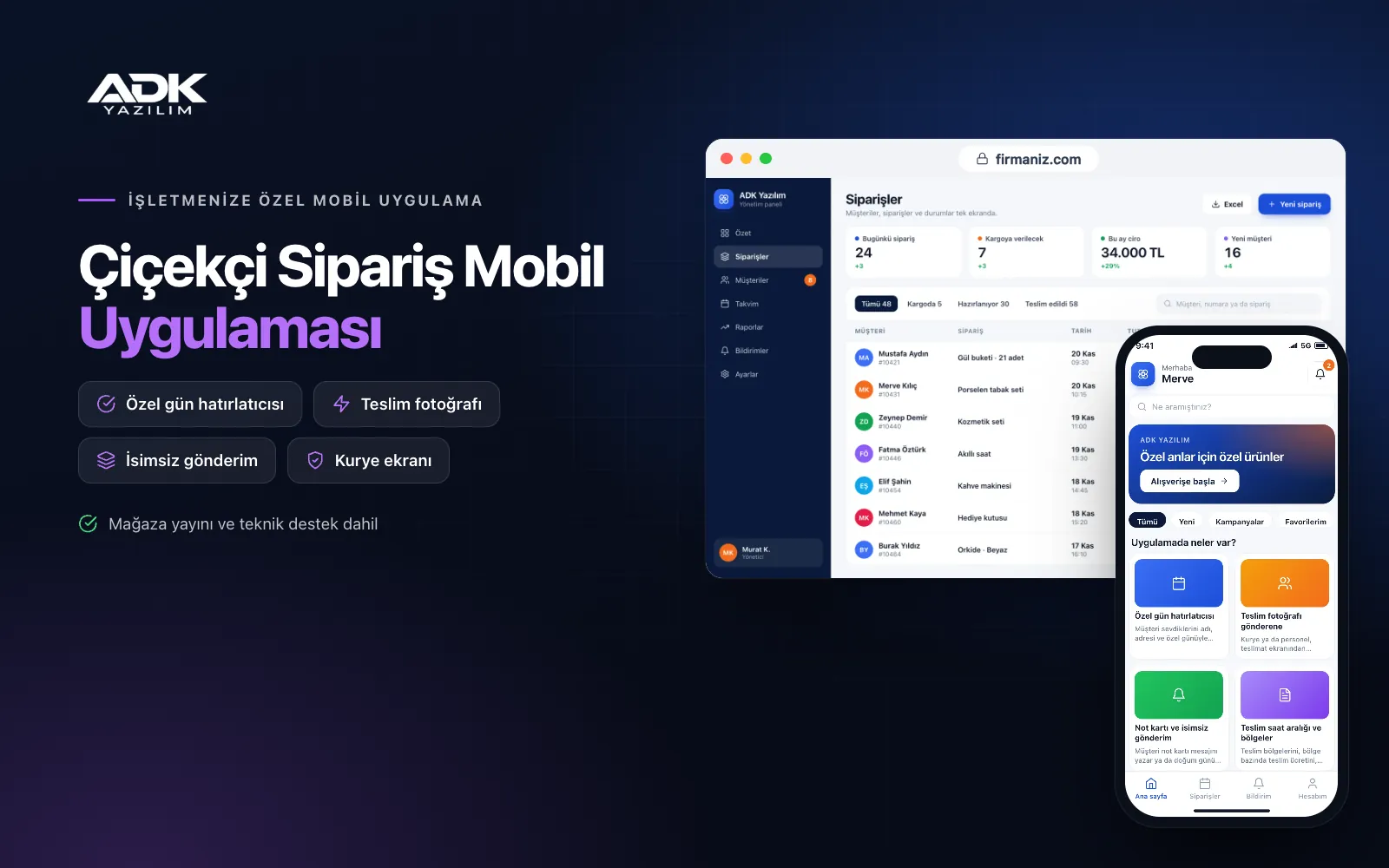
A florist ordering mobile app lets customers send flowers to their loved ones in a few taps, under your shop’s name. They choose a bouquet or arrangement, enter the recipient’s address and a delivery slot, write their card message and pay by card. No more taking addresses down over the phone, noting messages letter by letter or chasing answers to “has the delivery arrived?”.
What brings customers back is the special day reminder: they save their mother’s birthday, their wedding anniversary and their loved ones’ addresses once, and the app reminds them as the day approaches and lets them order in one tap. When the flowers are delivered, a photo is sent to the buyer. The app is published under your florist’s name on Google Play, on the App Store or on both.
Who is it for?
- Neighbourhood and city florists: Shops that want to move phone and message orders into a tidy channel.
- Boutique floral designers: Designers who want to present their work with photos and build a loyal following.
- Florists with several branches: Businesses that want orders routed to the branch nearest the delivery address.
- Florists serving companies: Shops regularly handling opening, congratulation and sympathy flowers for businesses.
- Flower and gift shops: Businesses that also sell chocolates, balloons and gifts alongside flowers.
Features that reassure senders and bring them back
Special day reminders
Customers save their loved ones with a name, address and special day such as a birthday, a wedding anniversary or Mother’s Day. A reminder arrives the number of days before that they choose, and they pick the saved recipient and address and order in one tap. In the panel you see upcoming special days together and plan your flower purchasing around busy dates.
Delivery photo for the sender
When the courier or a member of staff marks the order as delivered on the delivery screen, they take a photo of the bouquet. The photo and delivery time reach the sender’s app as a notification. Senders see with their own eyes that the flowers arrived as prepared and on time; for customers in another city, it is a reassuring detail that encourages them to order again.
Card messages and anonymous sending
Customers write their card message or choose a ready-made text for a birthday, congratulations, get well soon or sympathy and edit it. When anonymous sending is chosen, the sender’s name does not appear on the card or at delivery, and the courier screen shows an “anonymous” warning. The card text sits on the preparation screen ready to print.
Delivery time slots and areas
You define delivery areas, a delivery fee for each area, time slots and the cut-off time for same-day delivery. Customers see only available slots, and full slots cannot be chosen. The recipient’s phone number appears on the courier screen, and customers say at checkout what should happen if nobody is in.
Card payments and order tracking
Card payments are taken through an iyzico or PayTR account opened in your business’s name. The order received, being prepared, on the way and delivered steps reach the sender as notifications. You announce campaigns and pre-orders for busy days such as Valentine’s Day by notification.
How do you get started?
- Choose your plan: Pick Starter (one platform) or Standard / Professional (Android + iOS) to match the phones your customers use.
- Send your products: Share your logo, colours, bouquet and arrangement photos, prices, delivery areas and time slots.
- Publishing and setup: We connect your payment account, build the app under your florist’s name and publish it in your store accounts.
- Invite your customers: Print the app’s QR code on the back of your cards and display it in your shop.
Infrastructure, security and support
The app and web admin panel run on ADK infrastructure, and data is backed up every day. The addresses and phone numbers of saved recipients appear only in that customer’s account and orders, and for anonymous orders the sender’s name is not shown on the courier screen. Card details are never stored in the app. Panel users sign in with their own passwords and according to their permissions, and couriers see only the deliveries assigned to them. The developer account for each store the app is published on is opened in your business’s name; the business pays the account fees and we handle publishing and updates.
The app is published under your florist’s name in the store you choose (Google Play, the App Store or both); the web admin panel and server run on ADK infrastructure, so no separate server or domain is needed. The Google Play and Apple Developer Program accounts are opened in your business’s name; the account fees are not included, and we handle setup and publishing. The first-year fee covers brand customisation, setup, initial configuration, product import from Excel and remote training; from the second year a yearly hosting, update and support fee applies, lower than the first-year price. You can start with one platform on Starter and move to Standard (Android + iOS) by paying the difference. Card payments are taken through an iyzico or PayTR account opened in your business’s name, and transaction fees are paid to the payment provider. Live courier tracking, links to a florist network for out-of-town deliveries, SMS to recipients and e-invoicing are not included and can be added through custom development.
Fast delivery
Our ready-made product foundations get your project live quickly.
Security first
Secure coding standards, encrypted connections and regular updates.
Ongoing support
Maintenance, updates and technical support after launch. We stay by your side.



