
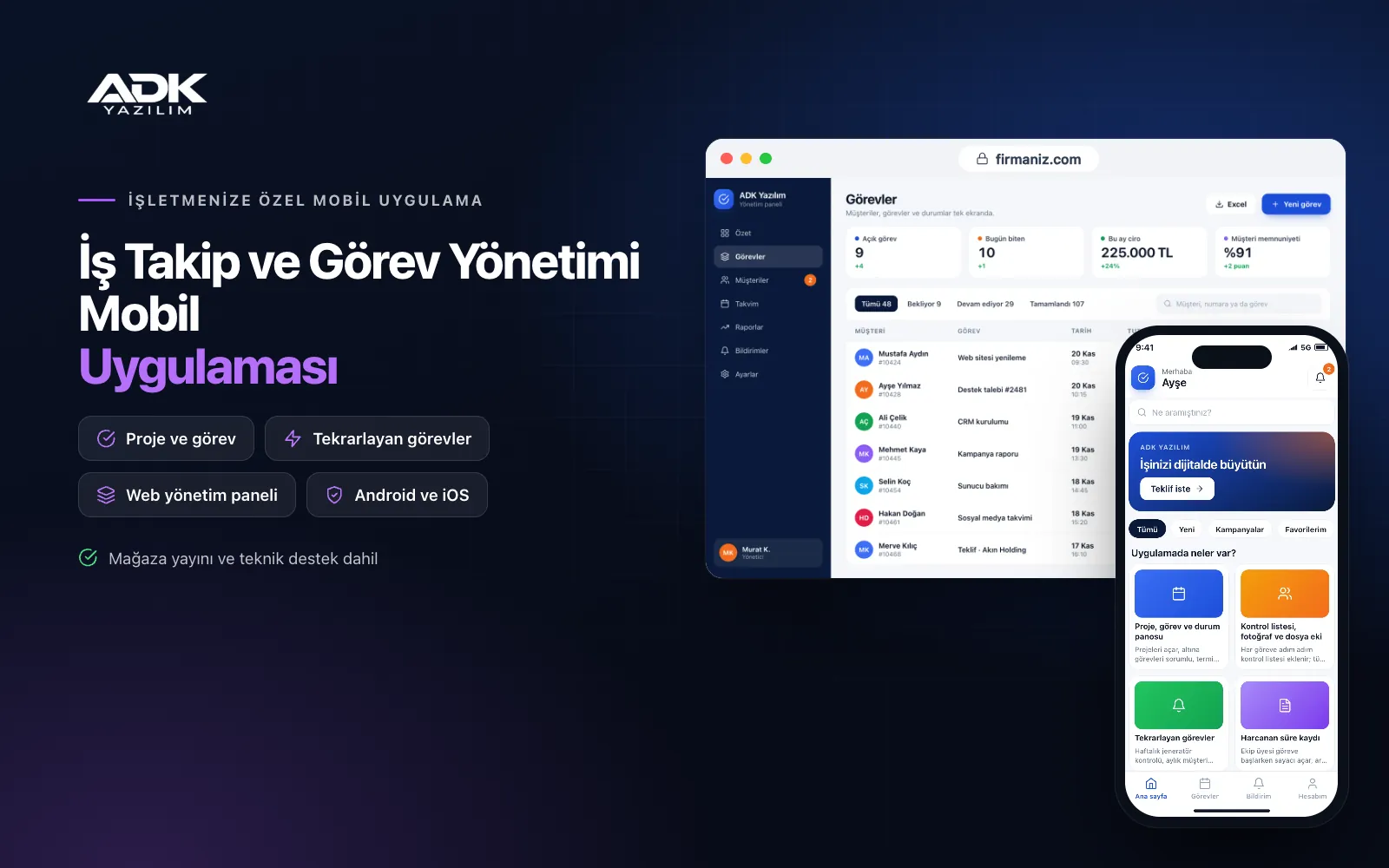
A job tracking mobile app stops the work you hand out from getting lost in group chats, notebooks and verbal instructions. Every task is assigned to one person with a due date and a priority; team members see their tasks on their phones, tick off the checklist, add photos and update the status. Answering “what happened with that job?” no longer takes a phone call, just a look at one screen.
Managers follow in the panel how many tasks are overdue in each project, whose workload is piling up and how much time each job has taken. Finished work goes to the customer with a sign-off link, and the customer’s approval is recorded along with the photos. The app is published under your company’s name on Google Play, on the App Store or on both, so your team uses its own company’s app.
Who is it for?
- Agencies and software teams: Teams delivering client projects task by task, with frequent revisions and approvals.
- Construction, fit-out and renovation firms: Companies tracking site work with photo progress records.
- Facilities and building management teams: Teams with weekly, monthly and yearly recurring checks and maintenance.
- Accounting and consultancy offices: Offices scheduling the returns, reports and client work that recur every month.
- SMEs with several departments: Managers who want to see where cross-department work is waiting.
Features from assignment to delivery
Projects, tasks and a status board
You open projects and add tasks under them with an owner, due date and priority. Tasks sit as cards on a board with “to do”, “in progress”, “in review” and “done” columns, which you can rename to match your workflow. Overdue tasks turn red and a notification goes to the owner and their manager. Comments under each task keep the conversation with the work itself.
Checklists, photos and file attachments
Each task can carry a step-by-step checklist, and you can require every item to be ticked before the task can be marked done. Team members photograph the work before and after with the phone camera and attach PDFs or drawings. Checklist templates for routine jobs are prepared once and applied to new tasks with a single tap.
Recurring tasks
Jobs such as a weekly generator check, a monthly client report or a yearly insurance renewal are defined once; the app creates the task automatically when it is due and assigns it to the owner. The task history shows whether the previous occurrence was completed. Routine work no longer depends on someone remembering it.
Time logs
Team members start a timer when they begin a task and stop it when they pause, or enter the time by hand. The panel shows estimated and actual time for each task, with totals by person and by project. For client work billed by the hour, you can export a monthly time breakdown to Excel and use it as the basis for invoicing.
Customer sign-off links
For a completed task or project stage, the customer receives a sign-off link. Without installing anything, they see the description and photos in their phone’s browser and either approve the work or write a correction note. Approval is recorded with date and time, and a correction note becomes a new task for the right person.
How do you get started?
- Choose your plan: Pick Starter (one platform) or Standard / Professional (Android + iOS) to match the phones your team uses.
- Share your structure: Send us your departments, team members, ongoing projects and the checklists you use most.
- Setup and publishing: We build the app under your company’s name, import your existing job lists from Excel and publish it in the store.
- Launch with your team: After remote training, assign work only through the app, and we review the first week’s report with you.
Infrastructure, security and support
The app and web admin panel run on ADK infrastructure, and data and attachments are backed up every day. Team members see only the projects they belong to, and the administrator, department lead and team member roles work with separate permissions. Customer sign-off links show only the relevant job and are created with an expiry. The developer account for each store the app is published on is opened in your company’s name; the company pays the account fees and we handle publishing and updates.
The app is published under your company’s name in the store you choose (Google Play, the App Store or both); the web admin panel and server run on ADK infrastructure, so no separate server or domain is needed. The Google Play and Apple Developer Program accounts are opened in your company’s name; the account fees are not included, and we handle setup and publishing. The first-year fee covers brand customisation, setup, initial configuration, project and task import from Excel and remote training; from the second year a yearly hosting, update and support fee applies, lower than the first-year price. You can start with one platform on Starter and move to Standard (Android + iOS) by paying the difference. Notifications are sent free as app notifications; if you need SMS, your own SMS provider account is connected and SMS charges are not included. More than 25 users, payroll or timesheet calculations, invoicing and automatic sync with accounting software are not included and can be added through custom development.
Fast delivery
Our ready-made product foundations get your project live quickly.
Security first
Secure coding standards, encrypted connections and regular updates.
Ongoing support
Maintenance, updates and technical support after launch. We stay by your side.



