
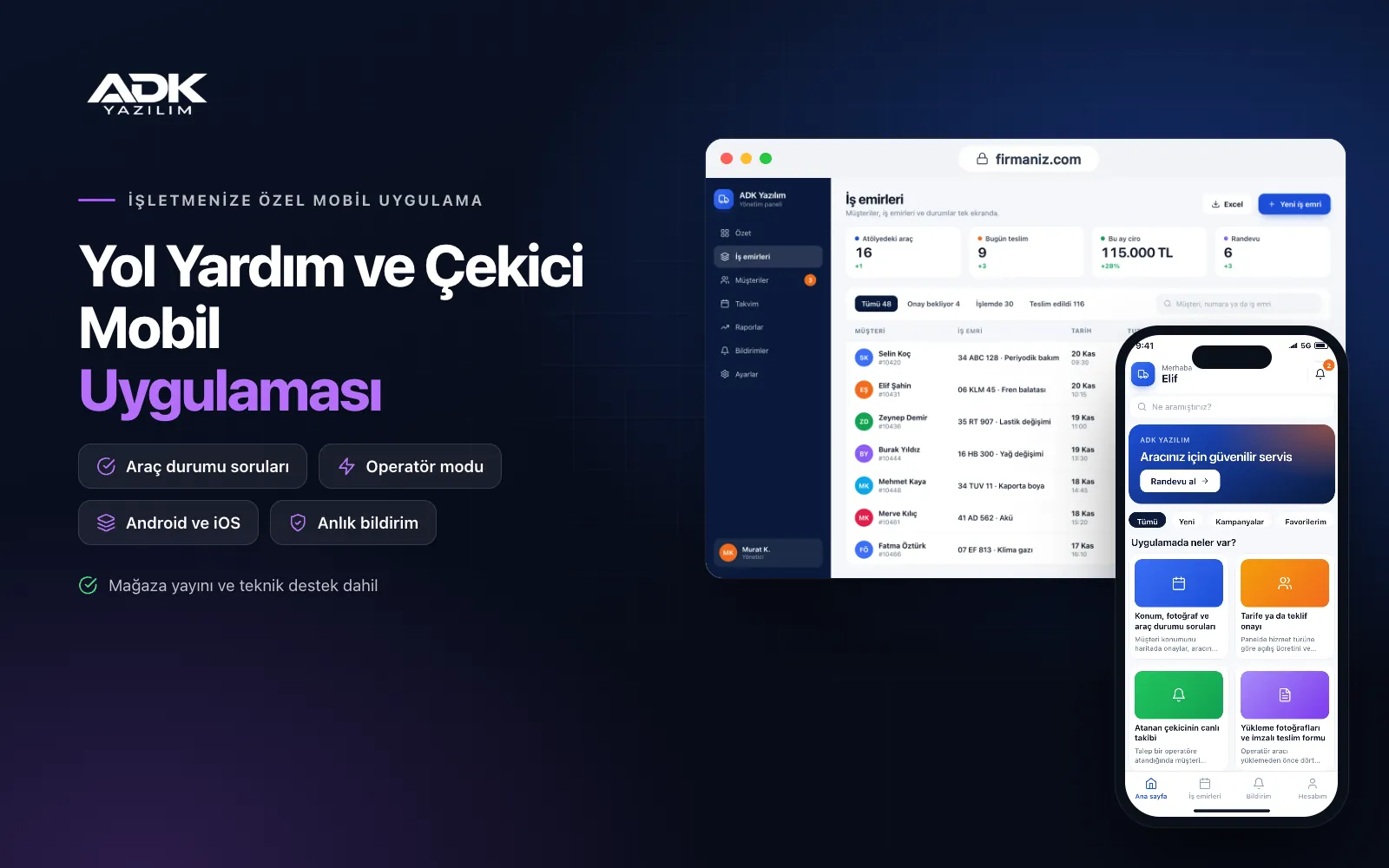
A roadside assistance mobile app sits on your customers’ phones with your tow and recovery company’s name. A stranded driver confirms their location on the map, chooses what they need (a tow, a battery jump start, a tyre change or fuel) and adds photos of the vehicle. Nobody spends minutes on the phone asking “where exactly are you?”, and the right truck sets off first time.
Customers approve the price calculated from your tariff, or the quote your operator sends, in the app and watch the assigned truck approach on the map. Operators work through the job step by step on their own screen, take photos before and after loading and collect the customer’s signature on delivery. For jobs from insurers or assistance companies, the file reference is recorded too. The app is published under your company’s name on Google Play, the App Store or both.
Who is it for?
- Tow and recovery companies: Businesses that take requests by phone and want location and vehicle details quickly and completely.
- Roadside assistance providers: Companies offering jump starts, tyre changes and fuel delivery who want them all in one app.
- Firms working with assistance companies: Businesses that record insurer jobs by file reference and list them by company.
- Tow operators partnered with garages and dealers: Operators who deliver vehicles to garages or dealers with a photo delivery record.
- Motorway and intercity operators: Companies that need the exact location at once when a request comes from a remote spot.
The roadside assistance process from request to delivery
Location, photos and vehicle condition questions
Customers confirm their location, add photos of the vehicle and answer a few short questions: does it start, do the wheels turn, can it be put in neutral, are the keys with you? The answers tell the operator which type of truck and equipment is needed. The drop-off point is chosen too, whether a garage, a dealer or the customer’s home.
Tariff or quote approval
In the panel you set a call-out charge and a price per kilometre for each service type, and the app shows an estimated amount based on the distance between pick-up and drop-off. For special cases the operator writes a quote and the customer accepts or declines it in the app. The approved amount is recorded, so there is no dispute about the price on delivery.
Live tracking of the assigned truck
Once the request is assigned, the customer sees the truck’s plate, the operator’s name and the truck approaching on the map. Notifications are sent when the truck sets off, when it is close and when it arrives. The operator’s location is shared only while a job is in progress, and tracking stops when the job ends or the operator goes off duty.
Loading photos and a signed delivery form
Before loading, the operator photographs the vehicle from four sides and any existing damage close up, and the app does not move on to loading until this step is done. Photos are taken again at the drop-off point and the person receiving the vehicle signs on screen. Photos, times, mileage and signature come together in one delivery form as a PDF.
Insurer and assistance file references
For jobs from an insurer or assistance company, the company name and file reference are recorded. At the end of a period the panel gives you a job list per assistance company with photos and delivery forms, so documents for invoicing and queries sit in one place.
How do you get started?
- Choose your plan: Pick Starter (one platform) or Standard / Professional (Android + iOS) to match the phones your customers and operators use.
- Send your company details: Share your logo, colours, service area, service types, tariff and your list of trucks and operators.
- Publishing and setup: We build the app under your company’s name, open the operator accounts and handle publishing in your store accounts.
- Tell your customers: With a QR sticker on the truck, posters at partner garages and business cards, customers download the app.
Infrastructure, security and support
The app and web admin panel run on ADK infrastructure, data is backed up every day and connections are encrypted. Photos and signed delivery forms are stored with the job they belong to, and customers see only their own requests. An operator’s location is collected only while a job is in progress, and panel users sign in with their own passwords and according to their permissions. The developer account for each store the app is published on is opened in your company’s name; the company pays the account fees and we handle publishing and updates.
The app is published under your company’s name in the store you choose (Google Play, the App Store or both); the web admin panel and server run on ADK infrastructure, so no separate server or domain is needed. The Google Play and Apple Developer Program accounts are opened in your company’s name; the account fees are not included, and we handle setup and publishing. The first-year fee covers brand customisation, setup, data import from Excel and remote training; from the second year a yearly hosting, update and support fee applies, lower than the first-year price. You can start with one platform on Starter and move to Standard (Android + iOS) by paying the difference. In-app card payments, SMS sending, automatic data exchange with assistance or insurance company systems and connection to vehicle tracking devices are not included and can be added through custom development.
Fast delivery
Our ready-made product foundations get your project live quickly.
Security first
Secure coding standards, encrypted connections and regular updates.
Ongoing support
Maintenance, updates and technical support after launch. We stay by your side.



