
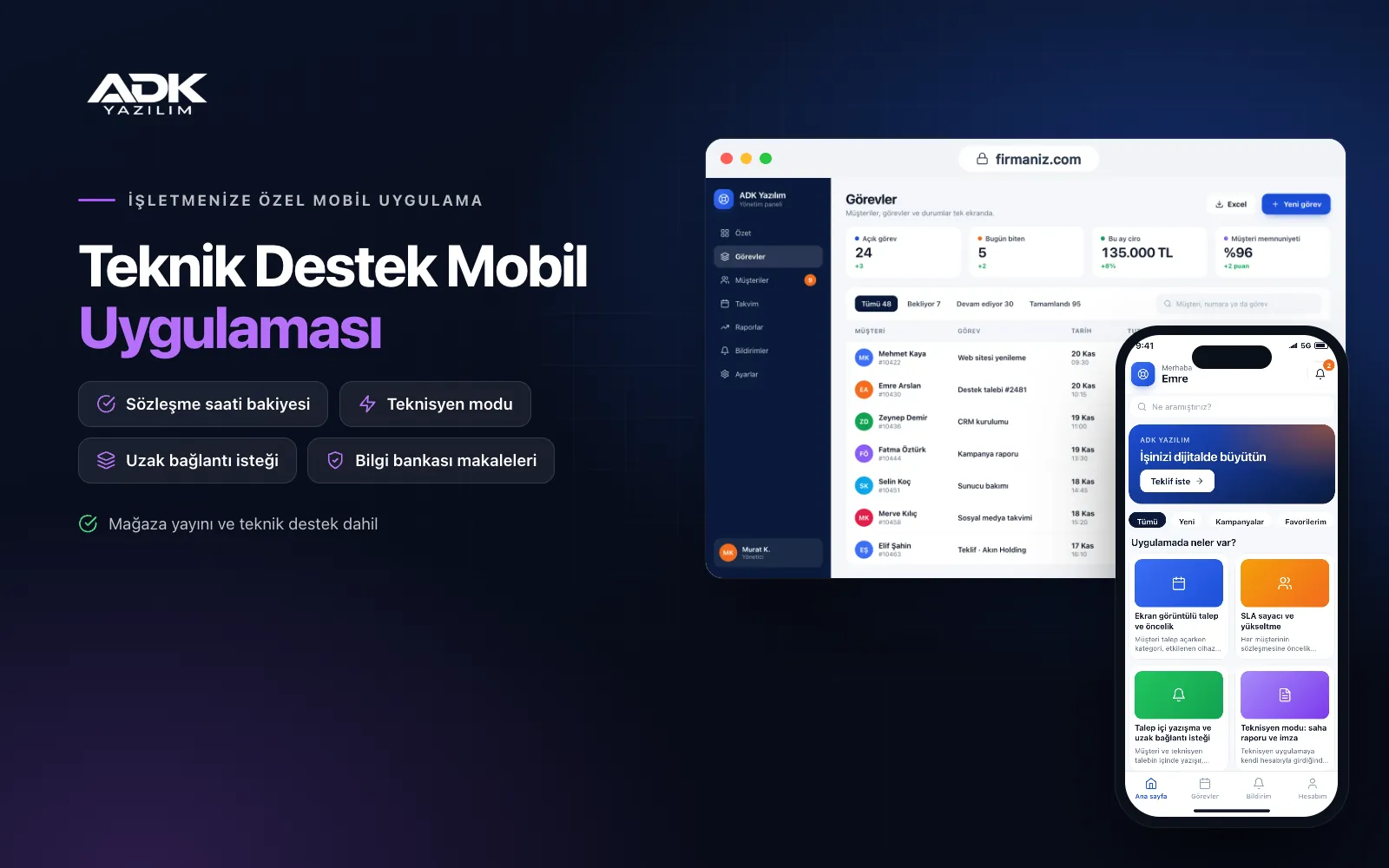
A technical support mobile app gathers your customers’ support requests into one channel instead of spreading them across phone calls, e-mails and messages. Customers describe the problem, attach a screenshot or photo, choose a priority and send the ticket; it appears on your team’s screen straight away and a timer starts based on the response time in their contract. Customers follow the stage of their ticket and who is handling it in the app, so the feeling that “nobody got back to us” disappears.
The same app becomes a work screen for your technicians: assigned tickets, on-site visit reports, parts used and the customer’s on-screen signature. Each customer’s support contract hours are deducted automatically, and the monthly breakdown is ready at the end of the month. The app is published under your company’s name on Google Play, on the App Store or on both, so customers find you on their phones under your own brand.
Who is it for?
- IT service companies: Teams supporting businesses’ computers, networks and servers and sending technicians on site.
- Software companies: Firms wanting to manage bug reports and feature requests from their customers in an orderly way.
- Managed service providers: Companies offering contracted support with monthly hour bundles and SLA tracking.
- Security system and automation installers: Firms receiving fault and service requests for the systems they install.
- In-house IT departments: IT teams who want to log support requests from employees.
Support features from request to resolution
Tickets with screenshots and priorities
When opening a ticket, customers choose a category, the affected device or module and a priority, and attach a screenshot, photo or short video. You decide which fields each category requires, so the first message arrives with the details you need. A customer who already has an open ticket on the same subject is pointed to it instead of opening a new one, which cuts duplicate tickets.
SLA timers and escalation
Each customer contract has first response and resolution times by priority. The timer starts when the ticket is opened and takes working hours and holidays into account. Tickets about to breach move to the top of the list, and the assigned technician and their manager are notified. At the end of the month the report shows, for each customer, the share of tickets closed on time.
Ticket chat and remote session requests
Customers and technicians message each other and share files inside the ticket, and every message stays on record. When a remote look is needed, the customer taps “request remote session” and enters their remote access ID; the technician connects using the remote desktop tool your company already uses. The session start and duration are recorded on the ticket and deducted from contract hours.
Technician mode: visit reports and signatures
When technicians sign in with their own accounts, they see their assigned tickets and visit plan. On site they enter the work done, parts used and time spent, and add before and after photos. The customer’s representative signs on the screen, and the signed service report goes to the customer and the panel as a PDF.
Contract hours and the knowledge base
For customers with a monthly or yearly support hour bundle, remote and on-site time is deducted automatically; customers see their remaining hours in the app, and both sides are notified when the balance runs low. You publish solutions to common problems as knowledge base articles, and customers see relevant articles before opening a ticket. When a ticket closes, the customer is asked for a satisfaction rating.
How do you get started?
- Choose your plan: Pick Starter (one platform) or Standard / Professional (Android + iOS) to match the phones your customers and technicians use.
- Define your contracts: Share your customer list, support contracts, SLA times by priority and hour bundles with us.
- Setup and publishing: We build the app under your company’s name, import customer and contract data from Excel and publish it in the store.
- Invite your customers: Move support requests into the app with an invitation link and a short announcement on how to use it.
Infrastructure, security and support
The app and web admin panel run on ADK infrastructure, and data and attachments are backed up every day. Each customer sees only their own company’s tickets, and administrator and employee roles can be separated on the customer side. Customers see a warning not to write sensitive details such as passwords in tickets. The developer account for each store the app is published on is opened in your company’s name; the company pays the account fees and we handle publishing and updates.
The app is published under your company’s name in the store you choose (Google Play, the App Store or both); the web admin panel and server run on ADK infrastructure, so no separate server or domain is needed. The Google Play and Apple Developer Program accounts are opened in your company’s name; the account fees are not included, and we handle setup and publishing. The first-year fee covers brand customisation, setup, initial configuration, customer and contract import from Excel and remote training; from the second year a yearly hosting, update and support fee applies, lower than the first-year price. You can start with one platform on Starter and move to Standard (Android + iOS) by paying the difference. Notifications are sent free as app notifications; if you need SMS, your own SMS provider account is connected and SMS charges are not included. Remote desktop software and its licence are not included; connections are made with the tool your company uses. Automatic ticket creation from e-mail, phone system connection, automatic alarms from server monitoring systems and invoicing through accounting software are not included and can be added through custom development.
Fast delivery
Our ready-made product foundations get your project live quickly.
Security first
Secure coding standards, encrypted connections and regular updates.
Ongoing support
Maintenance, updates and technical support after launch. We stay by your side.



