
ADK Tercüman is an AI live interpreter that lets shops, cafés, restaurants, hotels, pharmacies, supermarkets and fuel stations talk with foreign guests without speaking their language. The guest speaks or types on the tablet at the counter, or on their own phone after scanning a QR code; the message reaches your staff in Turkish, and the staff member’s Turkish reply is delivered to the guest in their own language, as text and voice.
In tourist areas and in cities with growing international populations, the language barrier is the quietest way to lose a sale. Guests cannot ask for what they need, size and stock questions are left half-answered, and even simple directions at a pharmacy or petrol station take minutes. ADK Tercüman runs the conversation on a screen that opens at your own web address and carries your brand; guests do not download an app and your staff do not need to learn another language.
The system does more than translate. An assistant trained on your business information instantly answers common questions such as opening hours, the Wi-Fi password, payment methods or the nearest pharmacy, and passes anything it does not know to your staff. An emergency button shows 112 and other emergency numbers in the guest’s language. When the chat ends a satisfaction survey opens, and the results are collected in reports.
Who is the live interpreter for?
- Shops and retail: Stores that need quick conversations with foreign customers about sizes, colours, stock, fitting rooms and payment.
- Cafés and restaurants: Venues that want menu, ingredient, allergen and order questions to come from the guest’s own phone through a table QR code.
- Hotels and guesthouses: Properties that want room-numbered requests to reach reception in Turkish and replies to reach guests in their own language.
- Pharmacies: Pharmacies that need clear communication with foreign patients about medicine use, duty pharmacies and directions.
- Fuel stations and supermarkets: Businesses where questions arrive with a pump or till number and staff must see them at once.
- Every service in tourist areas: Hairdressers, jewellers, rental offices and information points welcoming guests from many countries.
What makes ADK Tercüman different
93 languages, no app to download
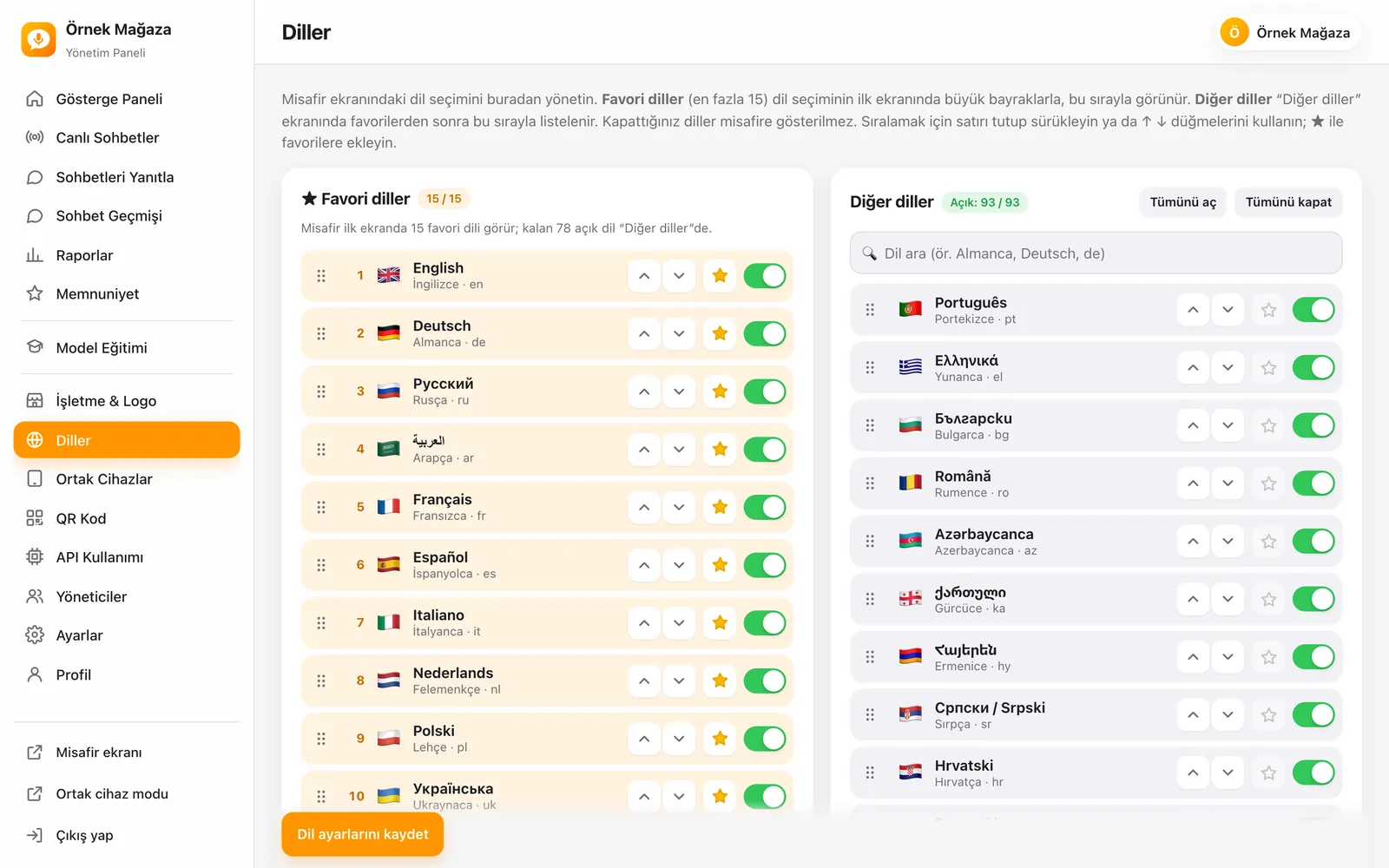
The guest screen has 93 languages ready. Put the 15 you see most as favourites on the first screen, order them by dragging and switch off languages you do not need. Guests download nothing; they use the counter tablet or scan the QR code and carry on from their own phone.
Voice and text conversation
Guests tap the microphone and speak; their voice is turned into text and translated. The staff reply appears on the guest’s screen in their language and is read aloud. Staff can also send voice messages in Turkish. The reading voice and speed on the guest screen are chosen in the admin panel.
Detects the language by itself
With manual language selection on, guests pick their language when they start. With it off, there is no language screen: the language is detected as soon as the guest speaks or types, and the screen and replies switch to it. A language-detecting speech model keeps similar languages from being mixed up.
An assistant that knows your business
With the Agent + Staff reply type, the assistant answers straight from your knowledge base and staff take over when needed. With the Staff type, the assistant does not answer; it only translates and every reply comes from your staff. You only need to write the information in Turkish, and the assistant translates it into the guest’s language.
The right information in an emergency, in the right language
The guest’s Help screen always shows 112, 155 Police, 156 Gendarmerie, 110 Fire, 114 Poison Advice and 158 Coast Guard. You add the tourist police, duty pharmacy, extra emergency numbers and a list of embassies; the embassy of the guest’s country moves to the top of the list.
Your own address, your own brand
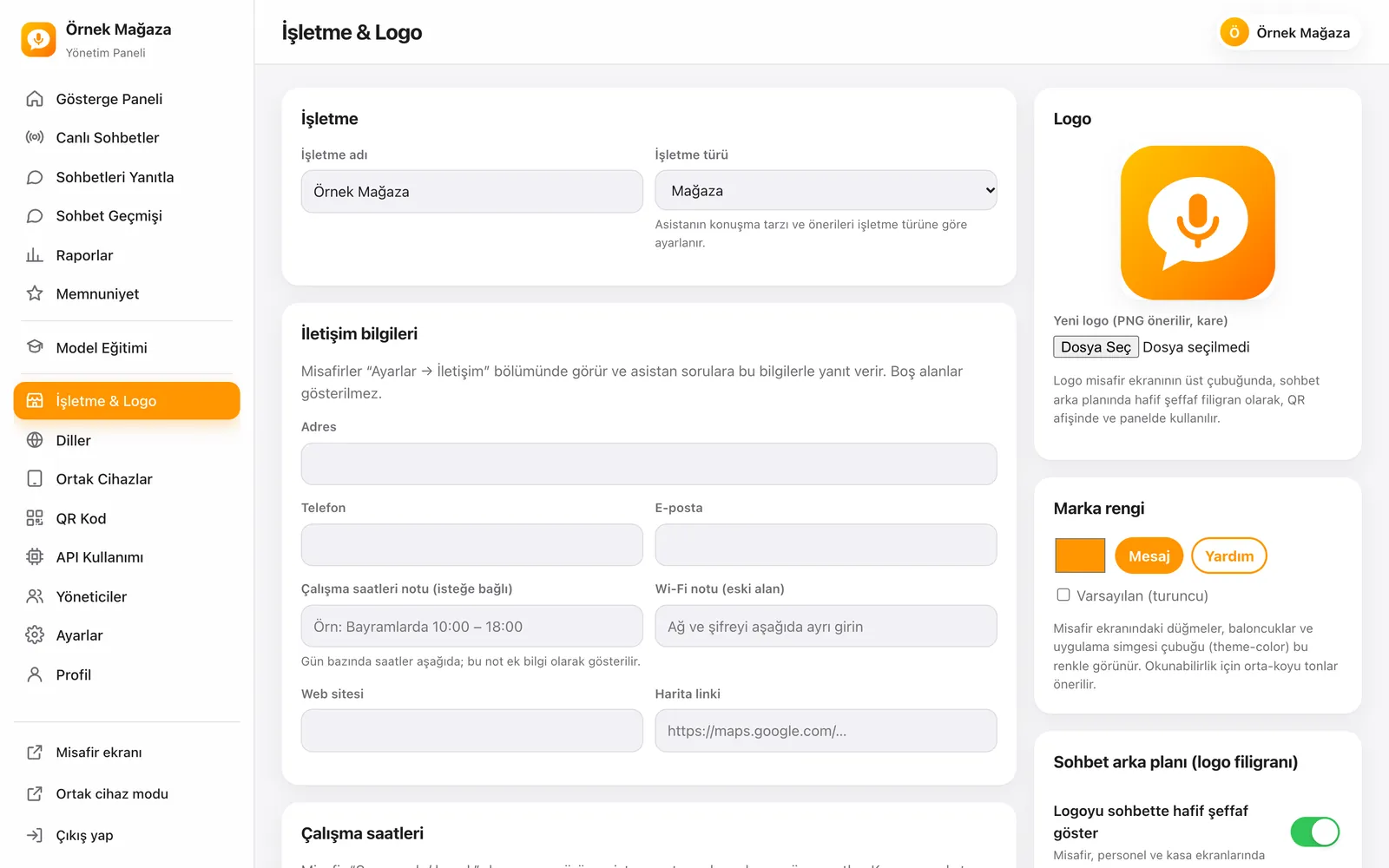
The system is published on your domain or a subdomain. Your logo appears in the guest screen’s top bar, as a light watermark behind the chat, on the QR poster and in the panel, and buttons and bubbles take your brand colour.
Guest screen and staff screen
Guest welcome screen
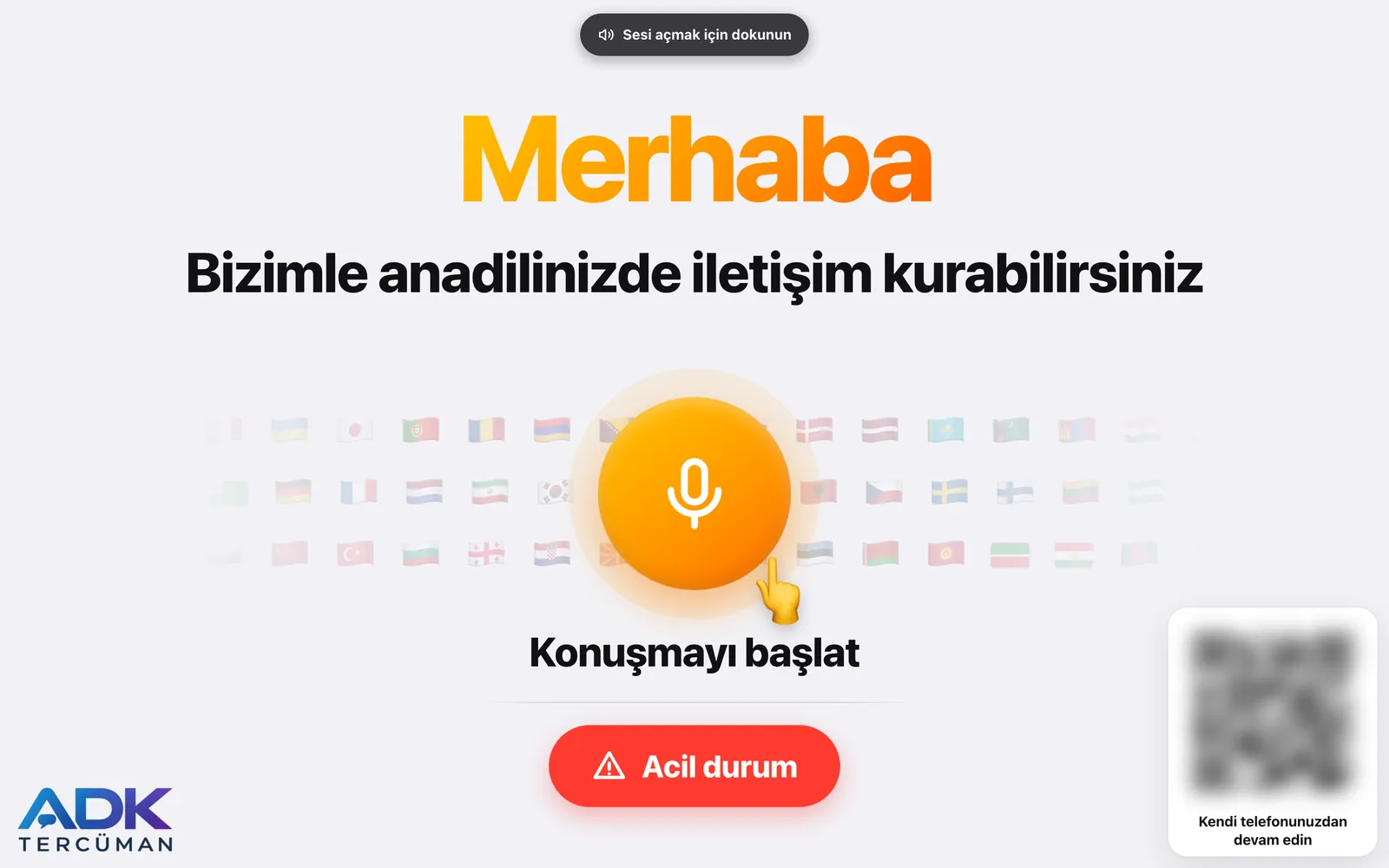
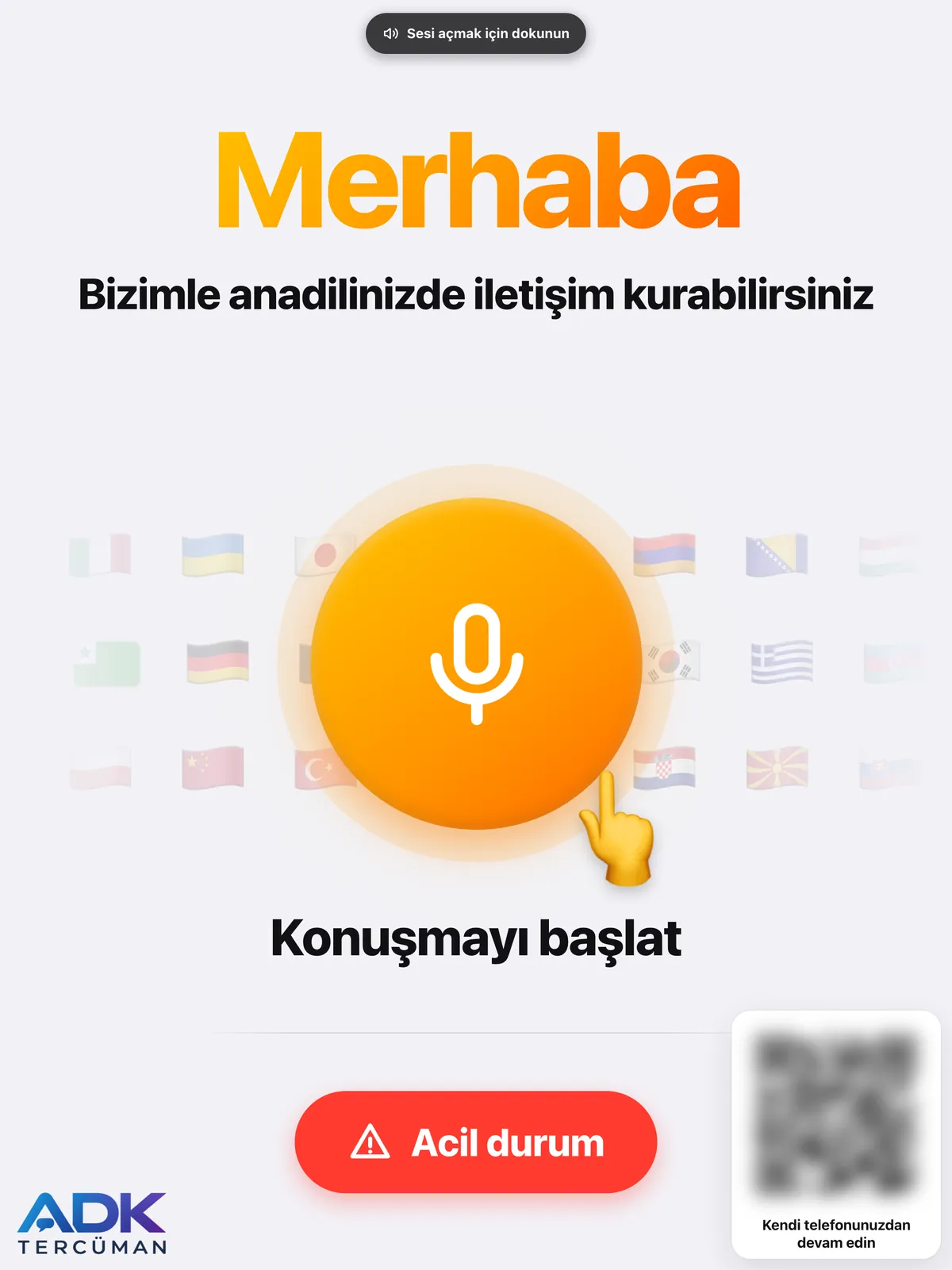
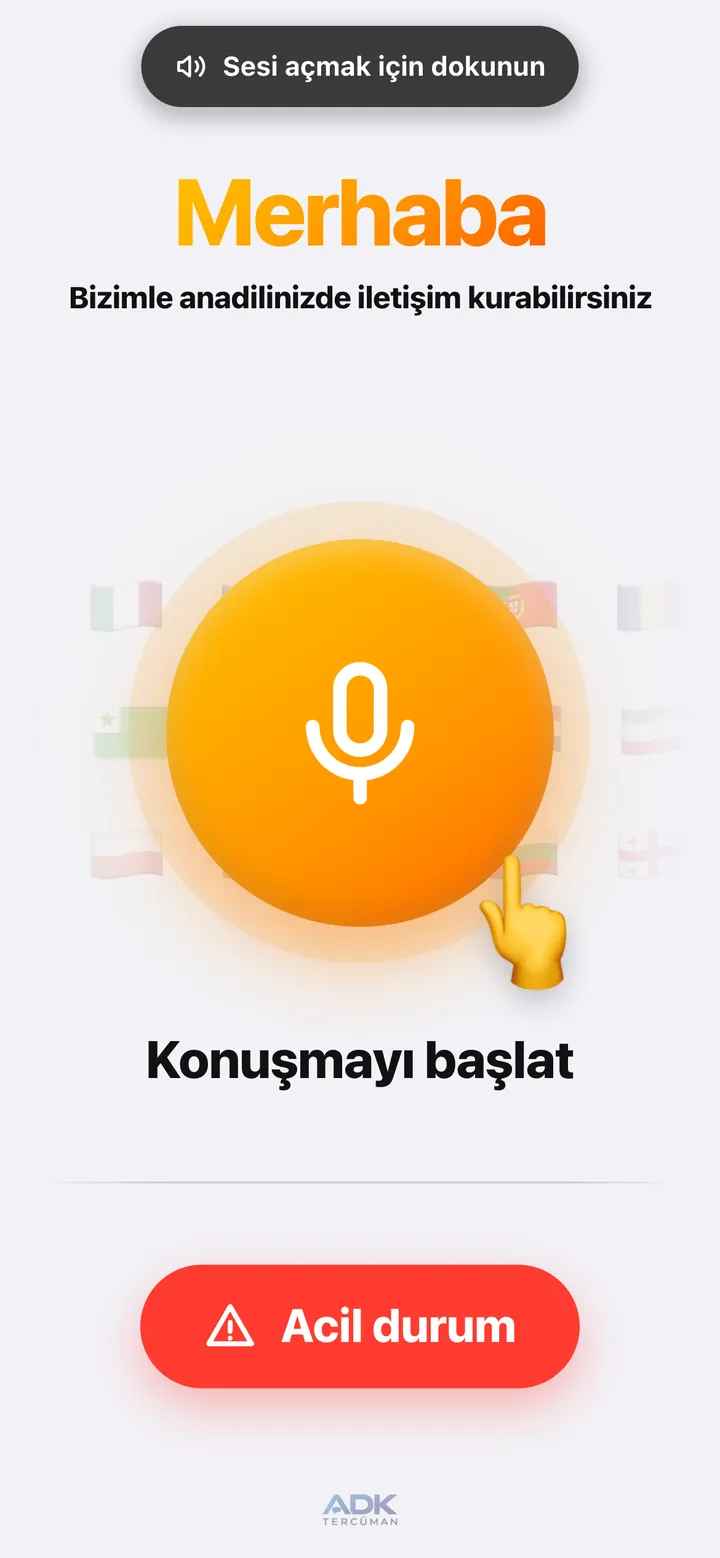
The welcome screen cycles “Hello” through different languages and tells guests they can speak in their native language. A large microphone button starts the conversation and a red button opens the emergency screen. A QR code in the corner lets the guest continue the chat on their own phone.
Personal mode with QR
When a guest scans the QR code on a table, room, pump or till, the chat opens directly on their phone. The number in the QR code fills in and locks automatically, so staff can see where the guest is. If you like, you can require personal chats to start only from the rotating QR on the counter screen, so an old QR photo or an address opened from outside cannot start a chat.
Shared device mode (counter tablet)
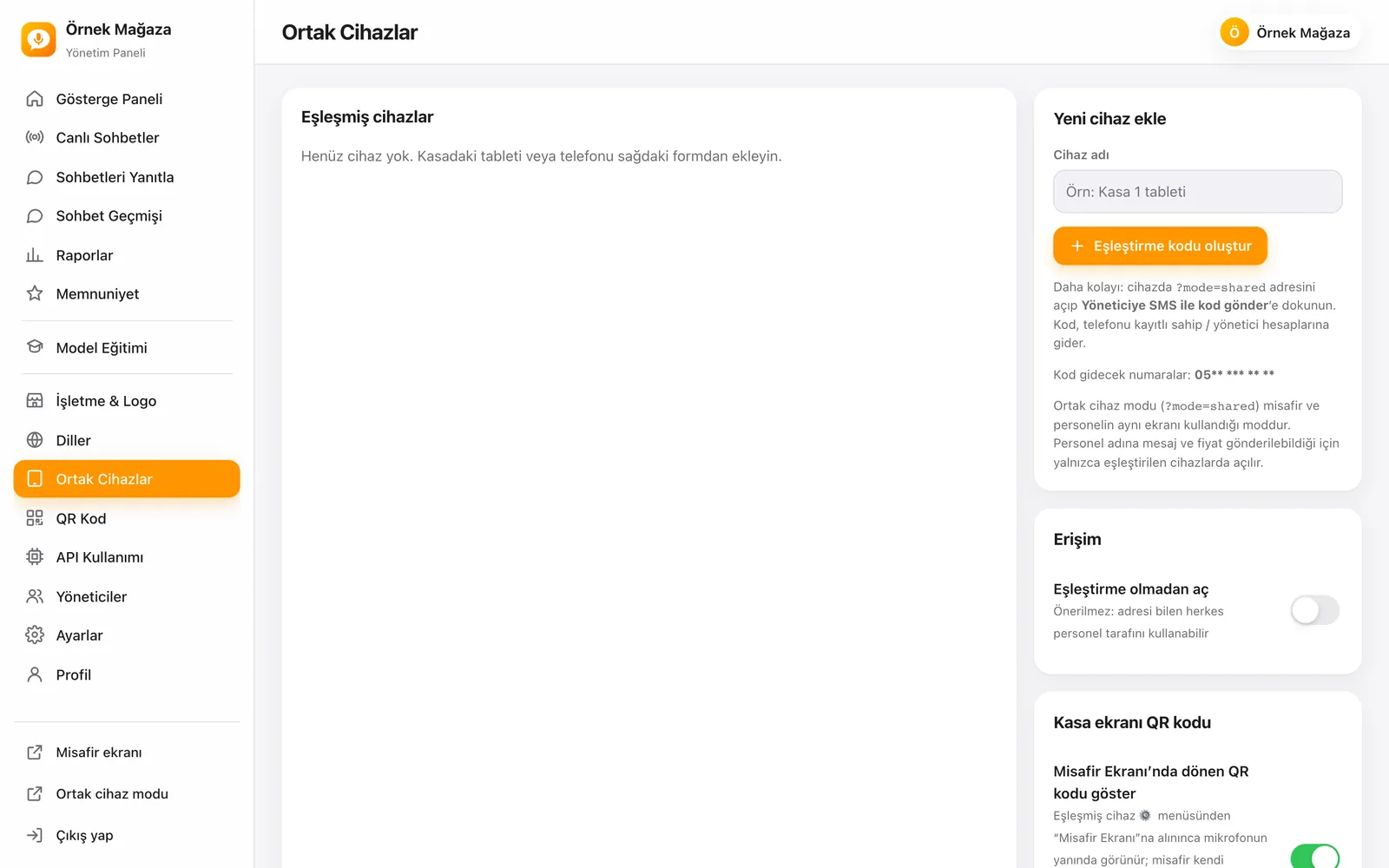
In this mode the guest and staff use the same screen. Because messages and prices can be sent on behalf of staff, it opens only on paired devices. A pairing code is generated in the panel, or sent by SMS to the registered managers’ phones when requested from the device. The QR code on the counter screen changes every 60 seconds and after every scan.
Staff screen
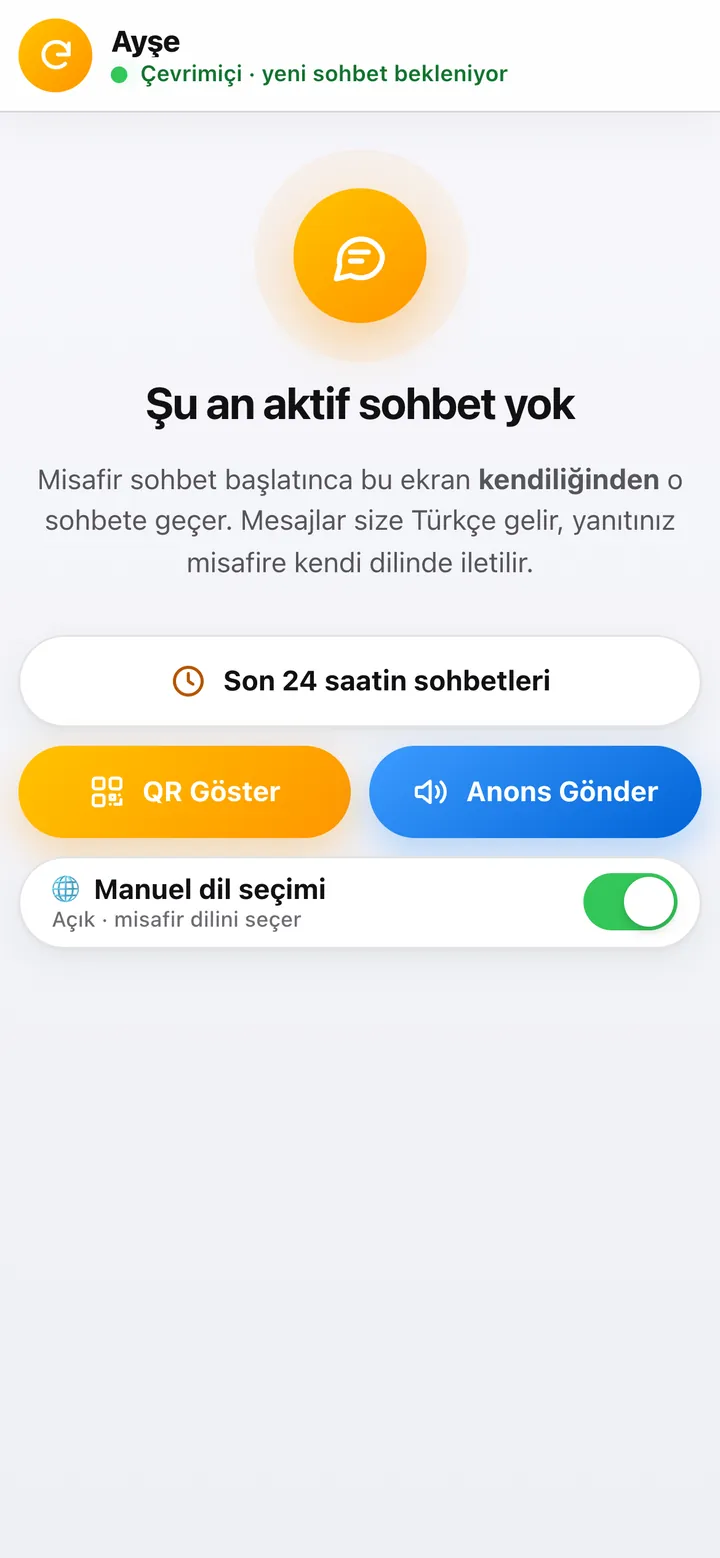
Staff sign in from their own phone or computer, and the screen works like an app. When a guest starts a chat, the screen switches to it automatically; messages arrive in Turkish and replies reach the guest in their own language. The last 24 hours of chats, a show-QR button and the manual language switch are on the same screen.
Quick replies and announcements on the guest screen
Define frequent answers as quick replies; staff send them with one tap and they are translated into the guest’s language. Staff can pick a language and start a spoken welcome and how-to announcement on the guest tablet, so a guest walking up hears how to use the system in their own language.
Prices with currency conversion
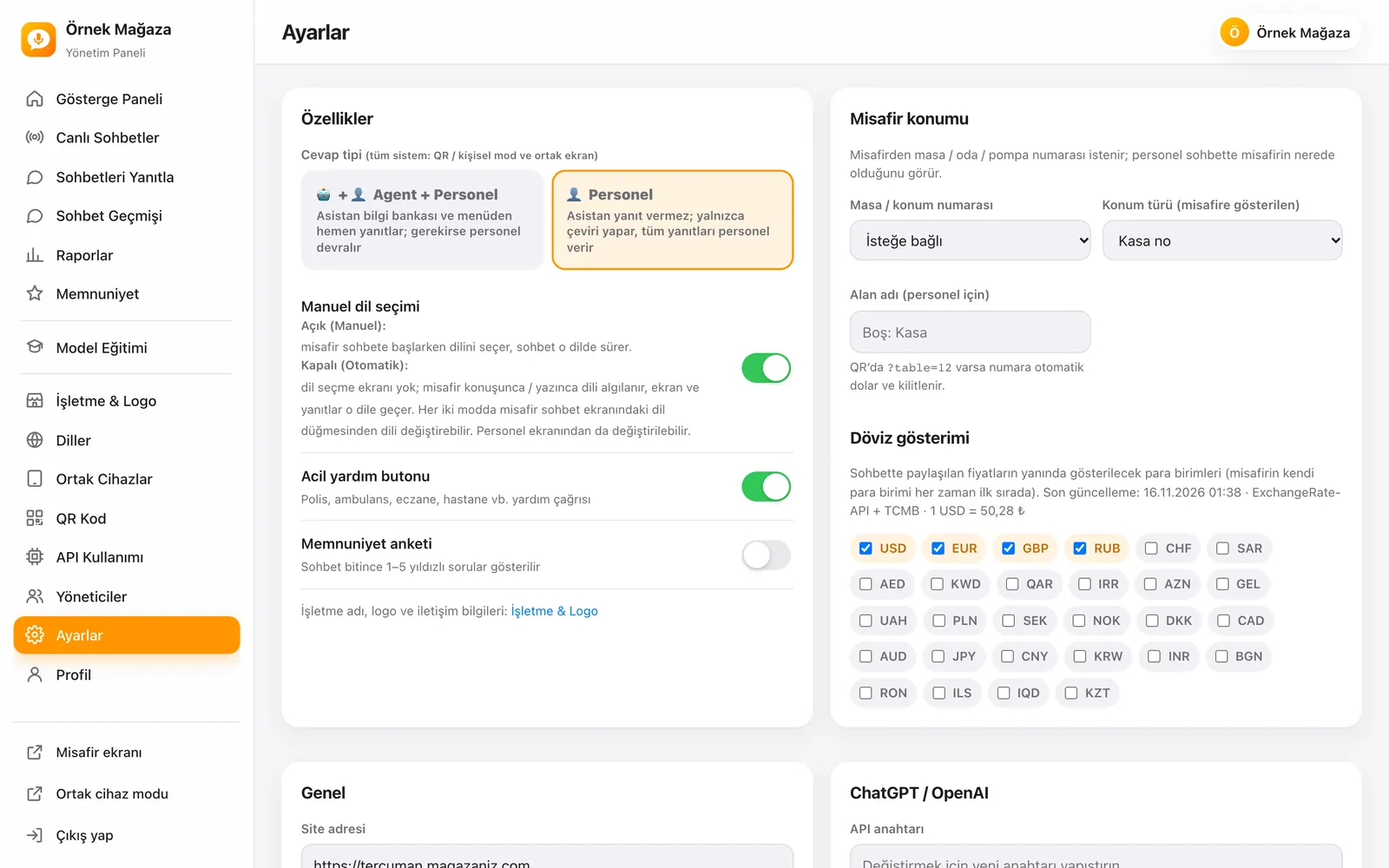
Prices shared in the chat are shown with the currencies you choose, and the guest’s own currency always comes first. Rates update hourly from the Central Bank of the Republic of Türkiye and ExchangeRate-API. Choose from USD, EUR, GBP, RUB, SAR, AED, CNY and many other currencies.
Contact, Wi-Fi and opening hours
From the settings menu, guests see your address, phone, website, map link and social media accounts. Day-by-day opening hours show whether you are open now. Guests copy the Wi-Fi password with one tap or scan the Wi-Fi QR code with another phone.
Admin panel and modules
Dashboard and live chats
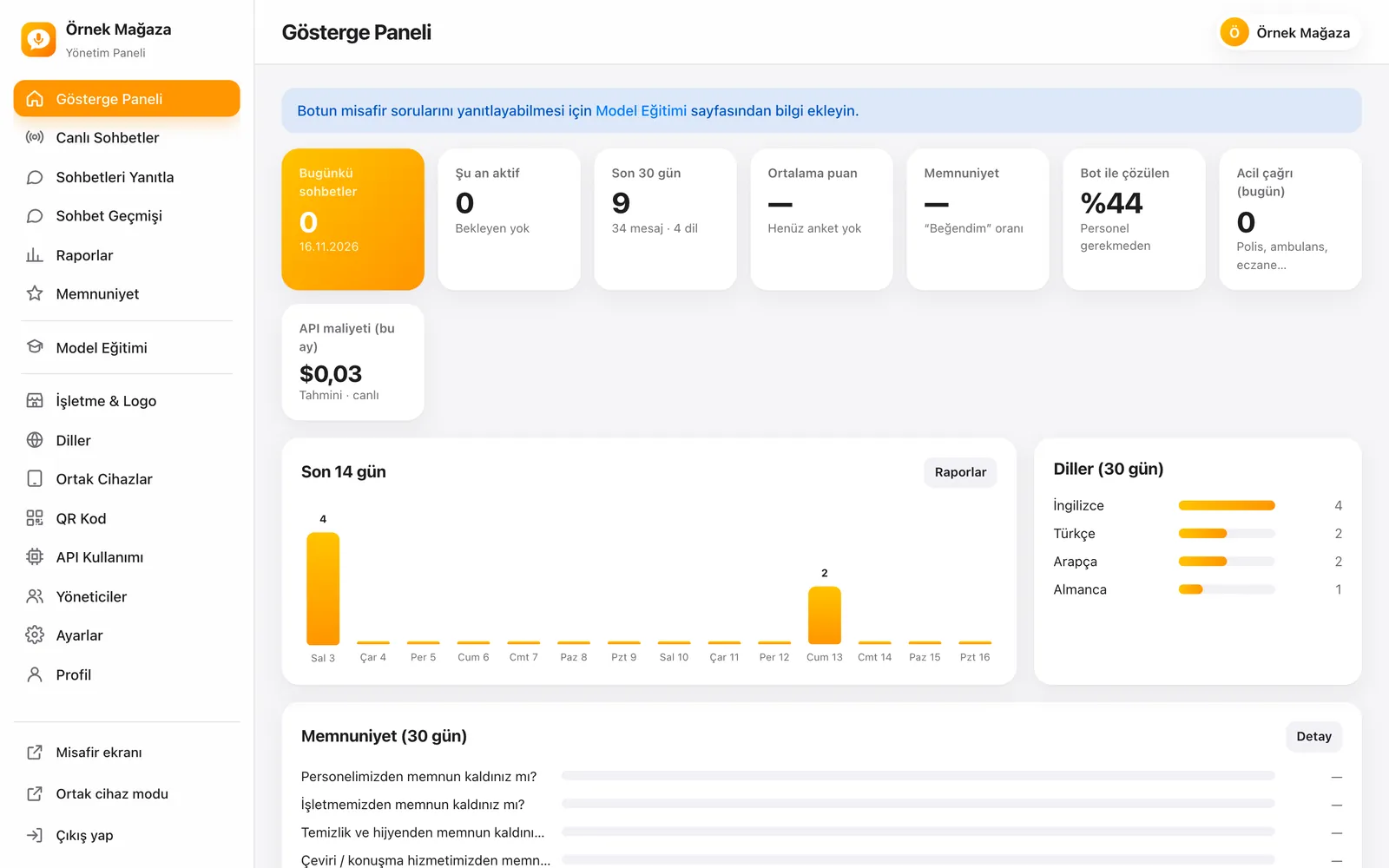
The dashboard shows today’s and active chats, chat and message counts for the last 30 days, the average rating, satisfaction, the share of chats resolved by the assistant, today’s emergency calls and this month’s AI cost as cards. The live chats screen lists active conversations with a sound alert; tap one to see the transcript and join it.
Reply to chats
Managers and staff see active and waiting chats on one screen. With browser notifications switched on, you hear about new messages even when the screen is in another tab. Messages appear in Turkish and your reply goes to the guest in their own language.
Chat history and data retention
Filter chats by date, language, status, mode, rating, staff member, emergency and questions the assistant could not answer, and download them as Excel (CSV). Each transcript shows Turkish and the original language side by side, records duration, first staff response and message counts, and can be saved as TXT or PDF. Closed chats older than the retention period you choose are deleted automatically once a day, together with messages, voice recordings and survey answers.
Reports
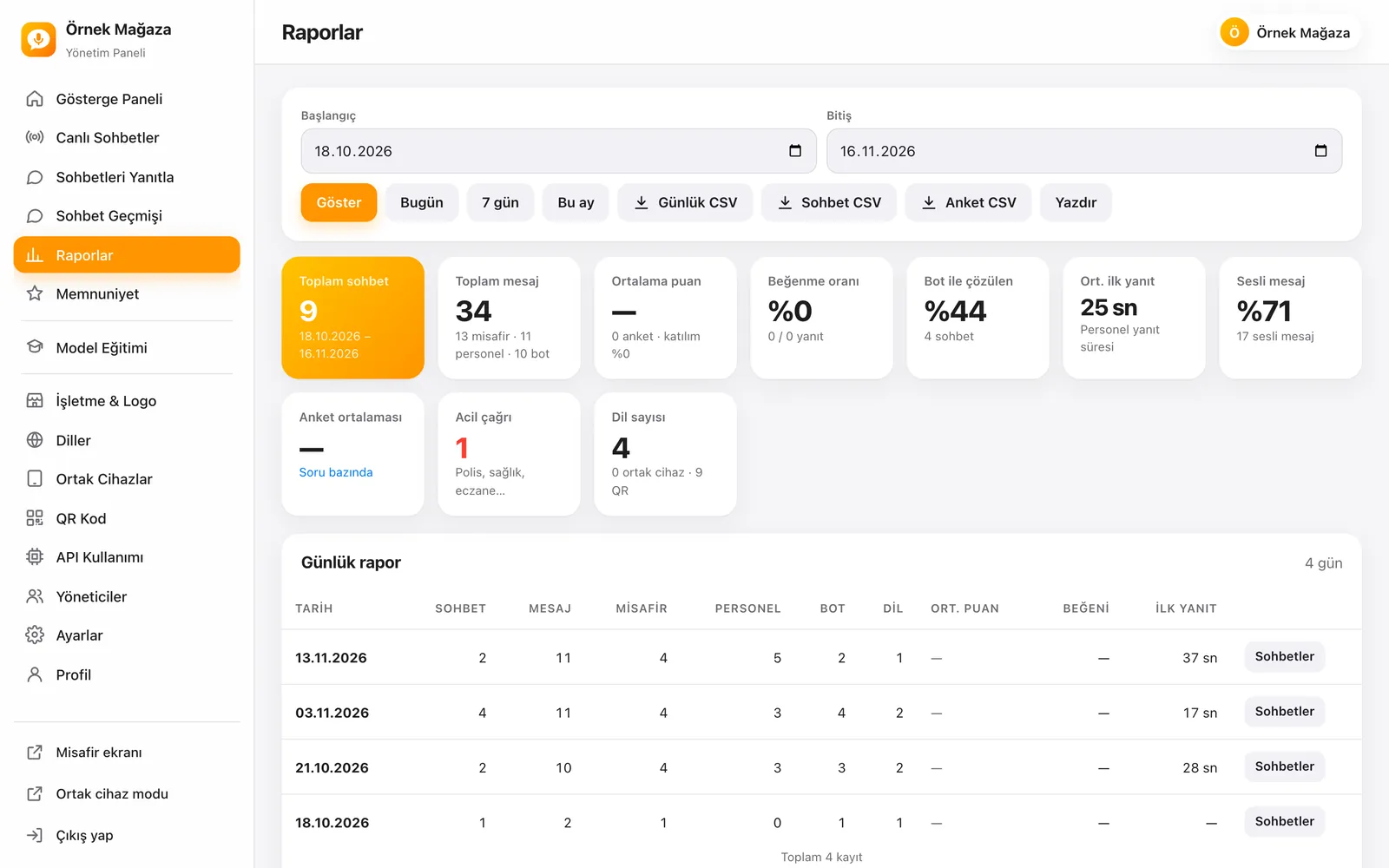
For any date range you get total chats and messages, guest, staff and assistant messages, average first response time, the share of voice messages, emergency calls and the number of languages. A daily report table, breakdowns by language, rating distribution, request topics and staff performance sit on the same screen. Daily, chat and survey data download as CSV.
Satisfaction survey and reviews
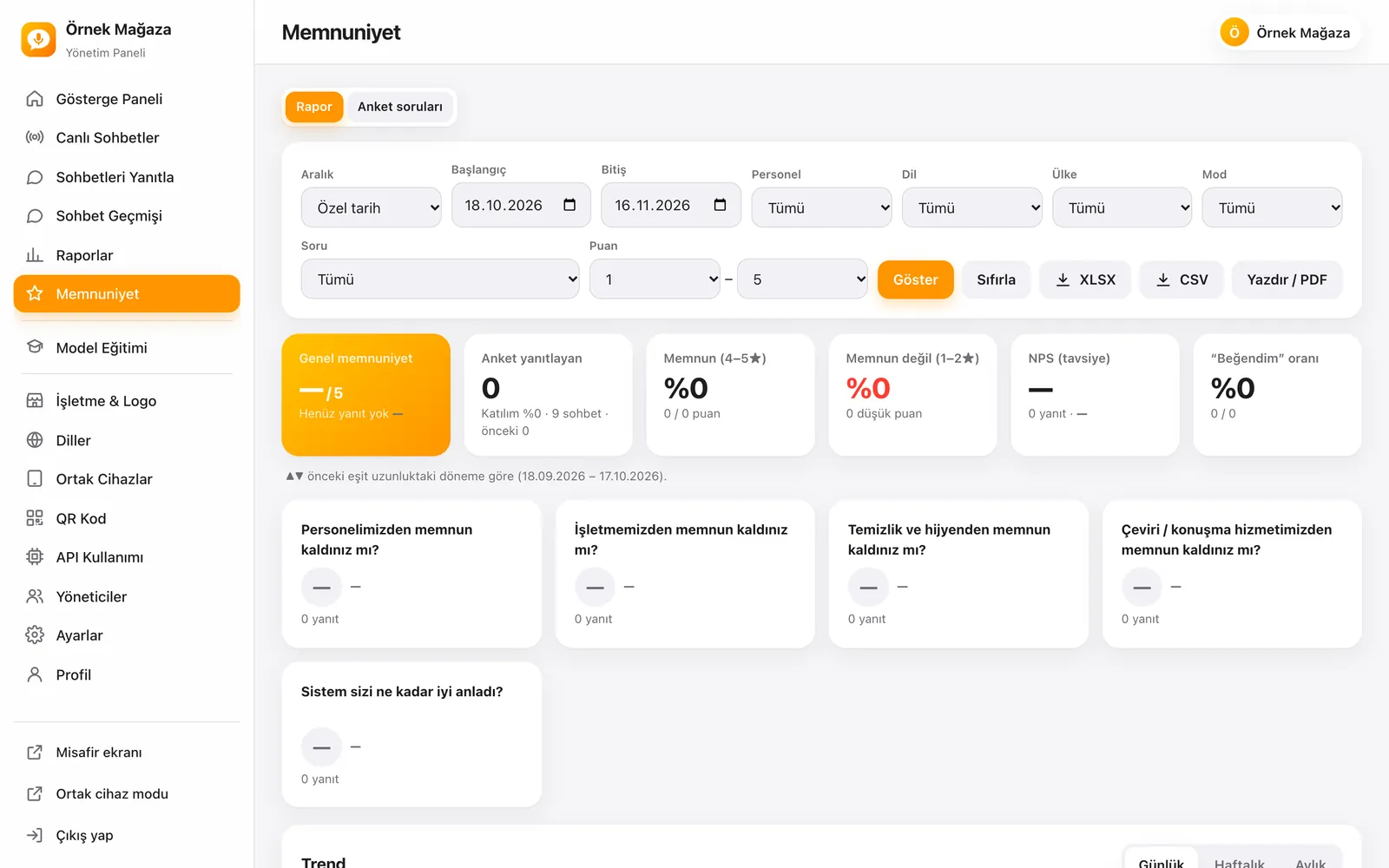
When a chat ends, guests see 1–5 star questions about the staff, the business, cleanliness and hygiene, the interpreting service and how well the system understood them. The panel shows overall satisfaction, NPS, like rate, daily, weekly and monthly trends, hour and day breakdowns and an AI-assisted period summary. You read and answer guest comments and export them as XLSX, CSV or PDF. Satisfied guests are shown your Google review link at the end of the survey.
Model training
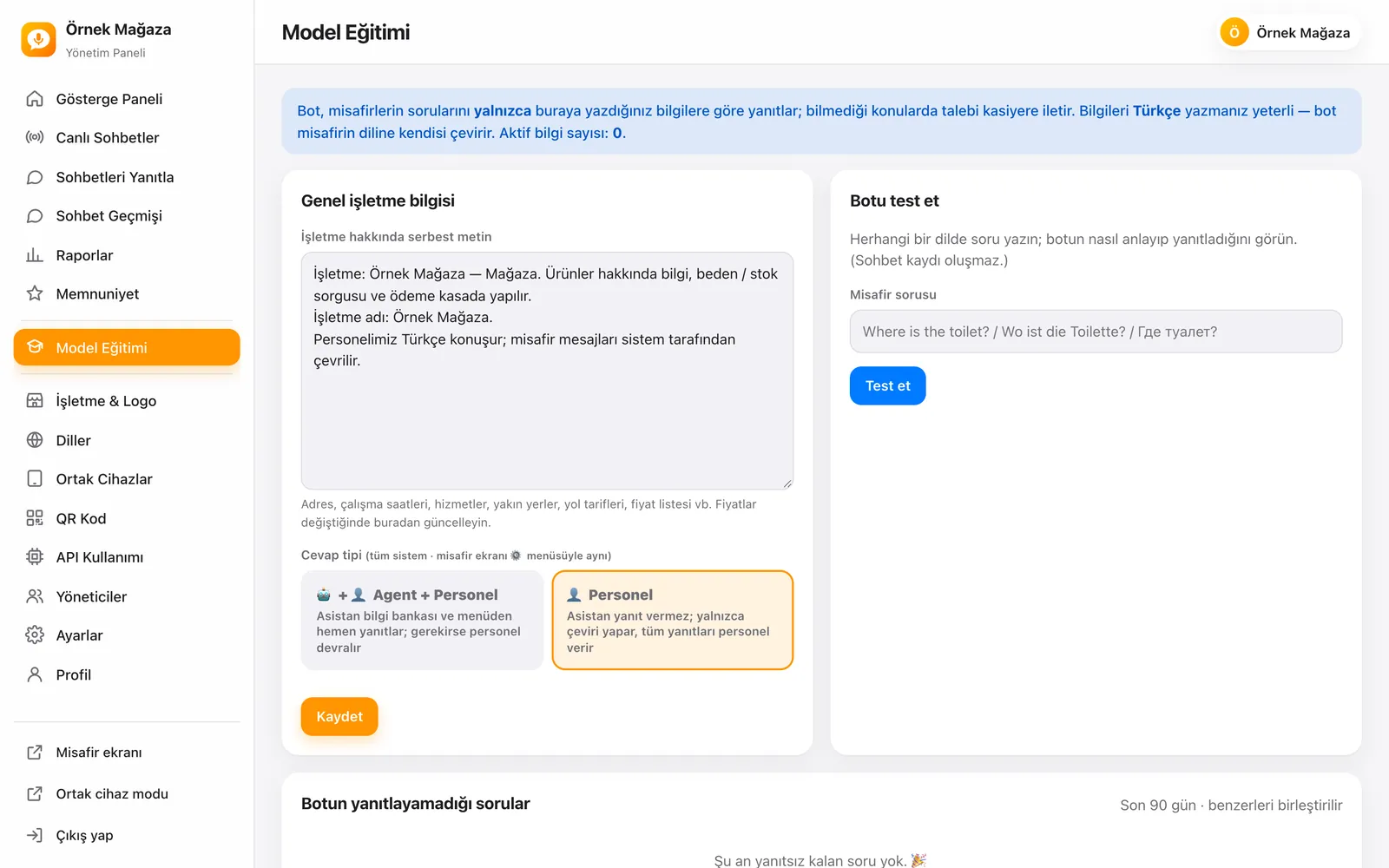
Write general information such as your address, opening hours, services, nearby places, directions and price list as free text, and add knowledge records made of a category, question and answer. Records can be imported in bulk from Excel or CSV. In the bot test area you ask a question in any language and see the assistant’s reply without creating a chat record; questions left unanswered in the last 90 days are listed with similar ones merged.
Business, logo and templates
Choose your business type from fuel station, café, restaurant, hotel, shop, supermarket, pharmacy or other, and the assistant’s style and suggestions adjust to it. A ready template brings the location type (table, room, pump, till), staff quick replies and the assistant description in one click. Your logo, brand colour and the opacity, size and position of the chat watermark are set on the same screen.
QR codes and posters
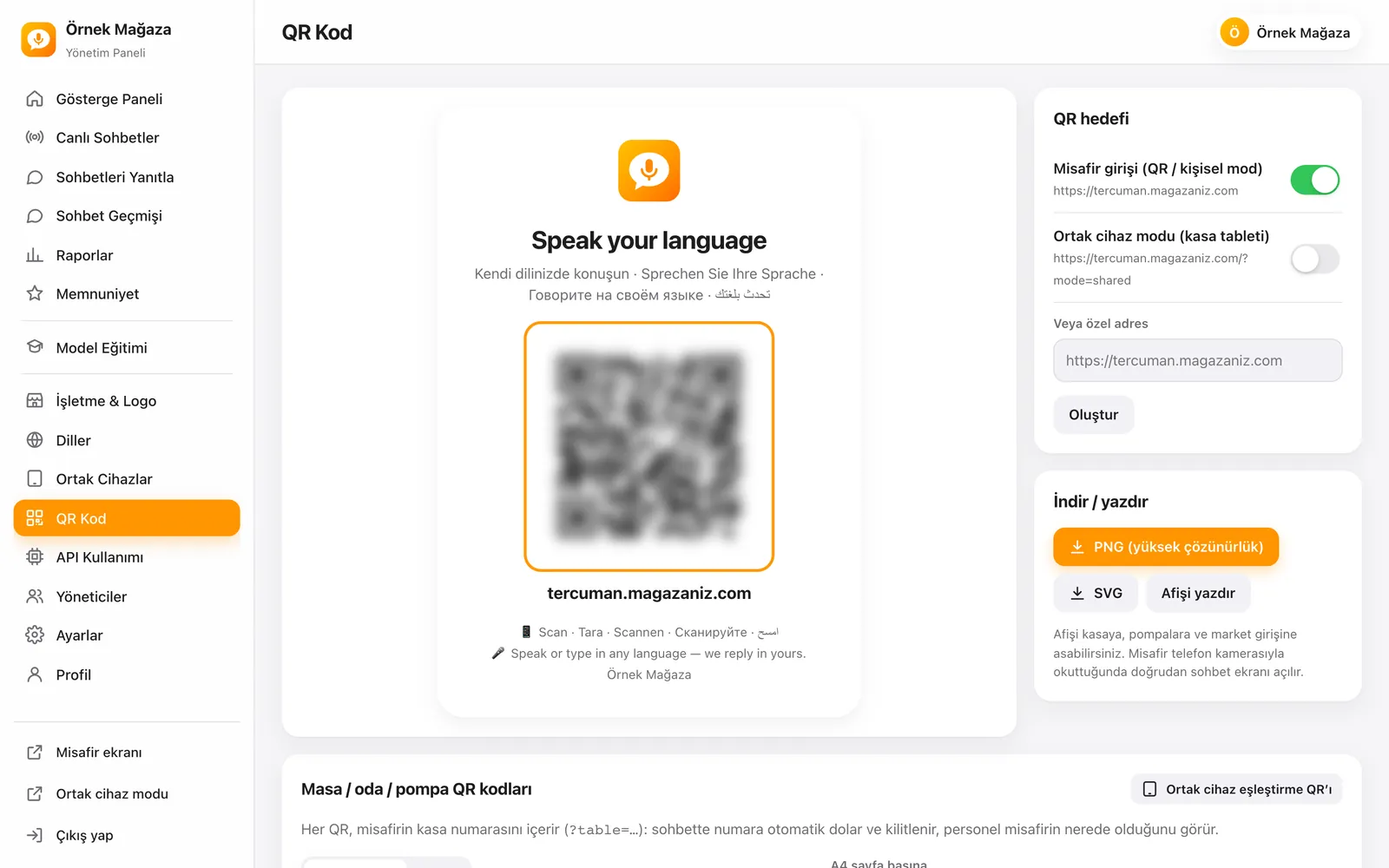
Download the multilingual “Speak your language” poster as PNG or SVG, or print it directly. Generate numbered QR codes for tables, rooms or pumps from a range or a list, with a prefix and 4, 6 or 8 cards per A4 page, and download them all as a ZIP. The shared device pairing QR is on this screen too.
API usage and cost tracking
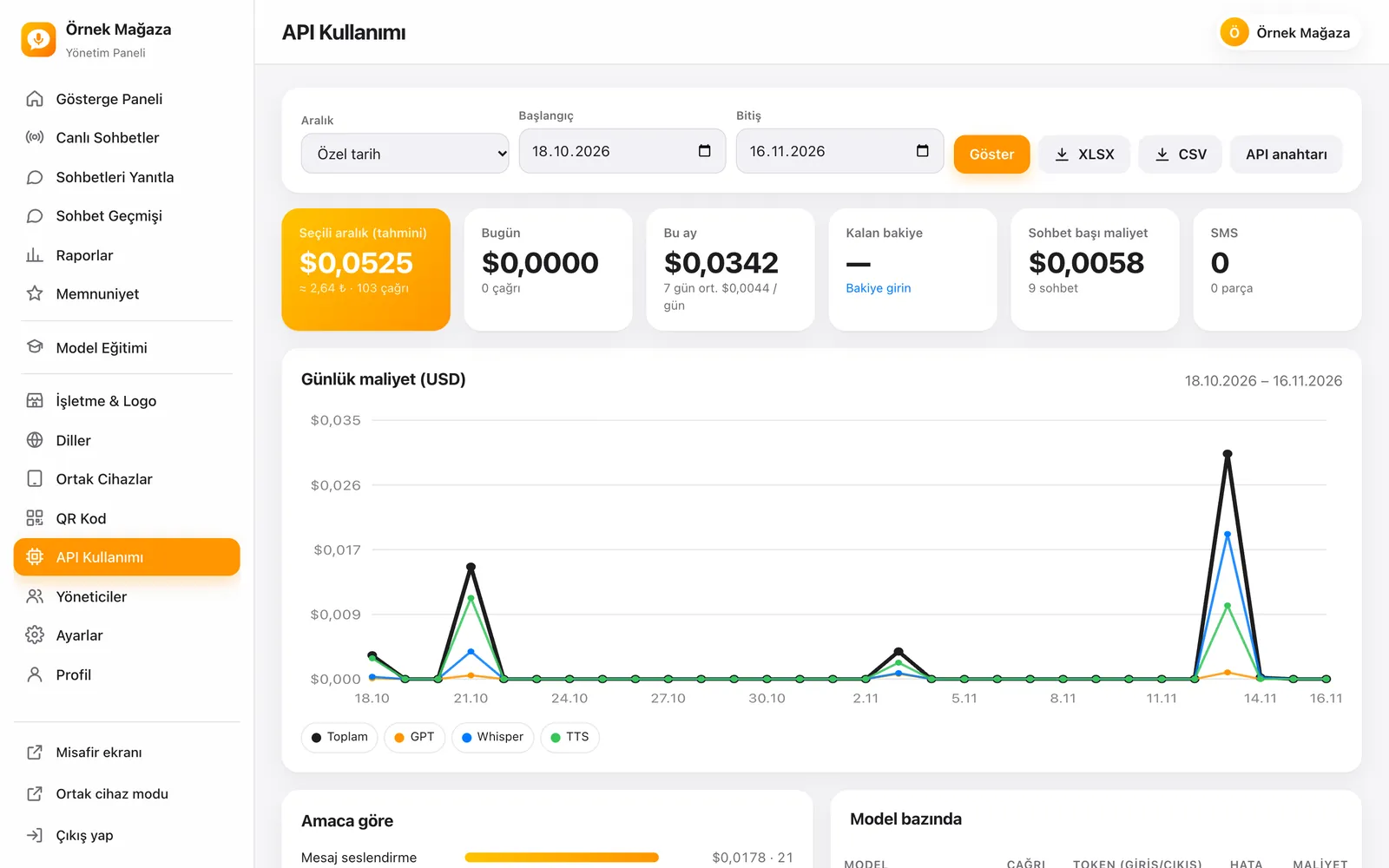
The estimated cost of AI calls is tracked in dollars and Turkish lira, split into translation, speech recognition and speech synthesis, by model and by purpose. The daily cost chart, cost per chat and daily usage table download as XLSX or CSV. Set a low-balance threshold and a daily spending limit, and send SMS alerts to managers. When the same text is read again, the audio comes from the cache and is not charged again.
Managers and security
Add managers with the Owner, Manager and Viewer roles: the owner manages all settings, API and SMS; managers use the chat, report, satisfaction and training screens; viewers only see. After five wrong passwords an account is locked for 15 minutes, and a manager with a mobile number on their profile resets the password through a link sent by SMS.
Comparing modes and reply types
| Feature | QR / personal mode | Shared device mode |
|---|---|---|
| Screen the guest uses | Their own phone | The counter tablet |
| How it starts | Table, room, pump or till QR | A paired device |
| Location number | Filled in from the QR | Optional or required |
| Staff reply | From the staff screen | On the same screen |
| Voice input and read-aloud | ✓ | ✓ |
| Emergency button | ✓ | ✓ |
| Satisfaction survey | ✓ | ✓ |
| Continue via the rotating counter QR | — | ✓ |
| Assistant answers from the knowledge base (Agent + Staff) | ✓ | ✓ |
| Translation only (Staff) | ✓ | ✓ |
ADK Tercüman comes as a single plan and both modes are included in the same licence. QR mode suits tables and rooms where guests use their own phones, and shared device mode suits a tablet at the till or reception; most businesses use both.
Connections and automations
ADK Tercüman works with the services below for AI, exchange rates and notifications.
Translation, speech recognition and speech synthesis run on your own OpenAI API key; usage is charged directly to your OpenAI account and tracked live in the panel. Manager security SMS messages (password reset, device pairing code, balance alerts) are sent through the SMS provider you set up. Chat, report and survey data export as CSV, XLSX and PDF.
Before you buy: AI usage is not included in the licence price and is paid through your own OpenAI account; the panel shows the estimated cost of every call, your remaining balance and your daily spend. The guest screen speaks 93 languages, while the staff screen and panel are designed for Turkish-speaking businesses.
SEO, speed and security infrastructure
- Panels closed to search engines: Staff and admin screens are hidden from search engines and open only to signed-in users.
- App-like screens: Guest and staff screens can be added to a phone like an app and open full screen.
- Audio cache: When the same text is read again with the same voice, the file comes from the cache; audio older than 7 days is deleted automatically.
- Secret keys on the server: OpenAI and SMS credentials are kept in a private file on the server and only shown masked in the panel.
- Device pairing: Shared device mode opens only on paired devices, so nobody else can send messages on behalf of staff.
- Sign-in lock: After five wrong password attempts an account is locked for 15 minutes.
- Data retention: Closed chats are deleted automatically with their messages, audio and survey data after the period you choose.
- SSL: Guest, staff and admin screens all open over an encrypted connection.
What the price includes
- Installation: Our team installs the system on your domain or subdomain.
- Licence: Use of the guest screen, staff screen and the full admin panel for the licence period.
- Go-live: Your business details, logo and languages are set up and your QR poster is prepared.
- Hosting and SSL: The system runs on ADK Yazılım servers over an encrypted connection.
- Updates: Software updates are applied to your installation.
- Support: Help and technical support by WhatsApp, email and phone throughout the licence.
Installation and go-live
- Order: Choose the plan and register a new domain, or tell us your existing domain or subdomain.
- Payment: Pay with Visa, Mastercard, American Express, Apple Pay or Google Pay through Stripe, or by bank transfer for USD, EUR and GBP orders. Your invoice is created automatically.
- Installation: Our team installs the system, enables SSL and connects your OpenAI key.
- Business details: Your business type, logo, brand colour, opening hours, Wi-Fi and emergency details are entered.
- Training and QR codes: The assistant’s knowledge base is filled in, QR posters and table codes are printed and the counter tablet is paired.
- Go live: Staff accounts are opened and your guests start talking in their own languages.
Infrastructure, security and support
Hosting, updates and backups are our responsibility. Guest, staff and admin screens run over SSL, and API and SMS credentials are kept in a private file on the server. Chat data is cleaned automatically according to the retention period you choose; your privacy notice should reflect that period.
You follow your orders, invoices and support tickets from your customer panel. The licence is yearly and continues from the second year with a yearly renewal fee. ADK Tercüman is ready-made software used under licence; maintenance and development stay with us.
ADK Tercüman runs on ADK Yazılım servers on your domain or subdomain; hosting and SSL are included in the licence. AI usage is paid through your own OpenAI account and SMS through your own SMS provider, and neither is included in the licence price.
Быстрый запуск
Готовая основа наших продуктов позволяет быстро вывести Ваш проект в работу.
Безопасность прежде всего
Стандарты безопасной разработки, зашифрованные соединения и регулярные обновления.
Постоянная поддержка
Обслуживание, обновления и техническая поддержка после запуска. Мы остаёмся рядом.

